

Most businesses only find out who really owns their marketing accounts when they try to leave an agency. The Google Ads account sits under the agency’s manager account, the Meta pixel lives in the agency’s Business Portfolio, the domain is registered under the agency’s name and the GA4 property was created in the agency’s Google account. None of that is necessarily bad faith. It is simply how agencies set things up when they move fast, and it becomes a problem the day the relationship ends.
This guide is the complete agency handover playbook we use in Singapore. It covers what to collect, the exact steps for each platform, the order to do them in, the legal points (PDPA and copyright) and what to do if the outgoing agency will not cooperate. Use it when you switch agencies, bring marketing in-house, or simply want to check that your business owns what it pays for.
Agency owners can use it too. The screens you use to hand access back to a client are the same ones a new client uses to grant you access, so the step-by-step screenshots below (taken from our own websites and accounts) work in both directions. There is also a section for agencies on onboarding clients so they always own their accounts, plus a copy-paste email for requesting access from an outgoing agency.
Table of Contents
- Why Agency Handovers Go Wrong
- The Golden Rule: Owner vs User Access
- The 30-Day Handover Timeline
- Copy-Paste Handover Request Email
- Domain, DNS and Hosting
- WordPress and the Website
- Google Stack: GA4, GTM, Search Console, Ads, Business Profile
- Meta: Facebook, Instagram, Ad Accounts and Pixel
- LinkedIn, TikTok, Email Platforms and SEO Tools
- Creative Files, Content and Intellectual Property
- Customer Data and PDPA Obligations
- When the Agency Will Not Cooperate
- Post-Handover Audit and Lockdown
- For Agency Owners: Onboard Clients the Right Way
- The Master Agency Handover Checklist
- Frequently Asked Questions
Why Agency Handovers Go Wrong
An agency handover rarely fails because of one big dispute. It fails because of dozens of small, invisible dependencies that nobody documented. In the handovers we have taken over from other agencies, the same problems come up again and again:
- Accounts created under the agency’s identity. A GA4 property inside the agency’s Google Analytics account, or an ad account owned by the agency’s Meta Business Portfolio. You can be given access, but you may never be able to own it.
- Single points of failure. Only one person at the agency, often a former employee, holds the login to the domain registrar or hosting panel.
- Hidden licences. Premium WordPress plugins, themes, stock images and fonts are licensed to the agency, not to you. When the agency stops renewing them, updates stop and features can break.
- Billing tangles. Ad spend runs through the agency’s credit line or payments profile, so switching them off pauses every campaign at once.
- Undocumented tracking. Conversion tags, offline imports, CRM webhooks and Zapier automations that nobody else knows exist until leads stop arriving.
- Unclear IP. Under Singapore’s Copyright Act 2021, the creator of commissioned work generally keeps copyright unless there is a written assignment. Many retainer contracts never address this.
The fix is to treat the handover as a structured project with a clear inventory, an order of operations and a sign-off, not as a polite email asking the agency to “send over the logins”. If you are still choosing a new partner, our guide to marketing agency red flags is worth reading first. An agency that resists giving you ownership at the start will resist it at the end too.
The Golden Rule: Owner vs User Access
Every platform in your marketing stack has two kinds of relationship: ownership (the legal and technical controller of the asset) and access (permission to work inside it). A healthy setup looks like this:

- Your business owns the asset, under a company email address such as [email protected] that does not depend on any one employee.
- The agency is granted access at the level it needs, as a user or a partner, and that access can be revoked in one click.
- At least two people inside your business hold the top admin role, so losing one person never locks you out.
When you plan the handover, sort every asset into one of three buckets:
| Bucket | What it means | Action |
|---|---|---|
| A. You already own it | Created under your company account; the agency has user access | Remove agency users and rotate shared passwords |
| B. Transferable | Agency owns it, but the platform supports transferring ownership (e.g. Google Business Profile primary owner, Facebook Pages, domains) | Run the formal transfer process before the contract ends |
| C. Non-transferable | Platform does not allow moving ownership (e.g. a Meta ad account or pixel owned by the agency’s portfolio, a GA4 property you cannot move between accounts) | Negotiate long-term access, export the data, and rebuild under your ownership |
Bucket C is where the money is lost. Identify it early because rebuilding takes the longest. For example, a new pixel or GA4 property needs weeks of data before your bidding and reporting are reliable again.
The 30-Day Handover Timeline
Most Singapore marketing retainers have a 30-day notice period, which is just enough time if you start on day one. Here is the order of operations we recommend.
Day 0 to 3: Inventory and notice
- Serve written notice, and in the same email request a full asset inventory (see the master checklist below). Ask for it within 7 days.
- Re-read your contract for clauses on notice, IP assignment, data return, handover assistance and any fees for “transition services”. Our marketing agency contract guide explains which clauses matter.
- Pull your own list of every platform you know you use, then compare it with the agency’s list. The gaps are your risk.
Day 3 to 14: Secure the critical assets
- Domain registrar and DNS first. Whoever controls DNS controls your website and email.
- Hosting and website admin.
- Google Analytics, Search Console and Tag Manager admin rights.
- Google Business Profile primary ownership.
Day 14 to 25: Paid media and data
- Ad account access and billing changeover, planned to avoid campaign downtime.
- Pixel and conversion tracking audit; build replacements for anything non-transferable.
- Export historical reports, creative files and keyword research.
- Brief the incoming team or in-house staff so they can start shadowing.
Day 25 to 30: Cut-over and lockdown
- Remove agency users from every platform (keep a log of what was removed and when).
- Rotate every password and API key the agency had seen.
- Get written confirmation that the agency has returned or deleted personal data.
- Run the post-handover audit.
If you are moving to a new agency, overlap the two by one or two weeks where possible. The incoming team’s onboarding process should begin with exactly this access audit.
Copy-Paste Handover Request Email
Before you send anything, try logging in to each platform with your own company Google account. If you cannot see an account, or you can see it but cannot add users, the outgoing agency needs to act. Send them this, adjusted for the platforms you use:
Hi [agency name], we’re moving our marketing to a new provider. Please could you, by [date]:
- Make [your email] an Administrator on our WordPress site, and share hosting and domain logins if you manage them.
- Make [your email] an Administrator on our Google Analytics 4 account and property.
- Make [your email] a verified Owner in Google Search Console.
- Transfer Primary owner of our Google Business Profile to [your email].
- Make [your email] an Admin on our Google Ads account, and confirm whether the account is billed through you or directly to us.
Once that’s done, we’ll remove your access ourselves. Thanks for your help.
Two details make this email work. First, it asks for ownership to be moved to you, not to your new agency. Once you hold ownership, you add the new agency as a user yourself. Second, it gives a date. Seven working days is reasonable for a cooperative agency, and a written deadline matters if you later need the recovery routes in the section below.
Domain, DNS and Hosting
Your domain name is the single most important asset in the whole agency handover. Lose it and you lose your website, your email and years of SEO equity. Handle it first.
Step 1: Confirm who the registrant is
The registrant is the legal holder of the domain. For a .sg or .com.sg domain, the registrant is recorded with SGNIC through an accredited registrar, and .com.sg domains must be held by a Singapore-registered entity. Check that the registrant is your company, not the agency or an individual staff member. Ask the agency for a screenshot of the registrant contact in the registrar panel, or check the public WHOIS record where available.
Step 2: Get control of the registrar account
You have two options:
- Push or transfer within the same registrar into a registrar account your company owns. Many registrars support an internal “push” to another customer account, which is fast and causes no downtime.
- Transfer to a new registrar. Ask the agency to unlock the domain and send you the authorisation (EPP) code, then start the transfer at your chosen registrar. Note that a recent registrant change or transfer can trigger a lock period on generic TLDs, so do not leave this to the last week.
Whichever route you choose, make sure the registrant, admin and technical contacts all use company-controlled email addresses, and turn on auto-renew with a company card. If you need help, our domain name services team handles registrar transfers for Singapore businesses.
Step 3: Take over DNS
DNS often lives somewhere different from the registrar, commonly Cloudflare. Before touching anything, export the full DNS zone (in Cloudflare: DNS > Records > Import and Export). Pay special attention to records that are easy to miss:
- MX records for email (Google Workspace or Microsoft 365)
- SPF, DKIM and DMARC TXT records. Lose these and your emails start landing in spam.
- Verification TXT records (Google Search Console, Meta domain verification, Microsoft)
- CNAMEs for subdomains like shop., booking., or your email marketing tracking domain
If the zone is in the agency’s Cloudflare account, the cleanest approach is to add the domain to your own Cloudflare account, import the exported records, compare record by record, then change the nameservers at the registrar. Cloudflare will give your new zone its own nameserver pair, and propagation is usually quick. Alternatively, the agency can invite you as a member of its account, but that is only a stop-gap.
Step 4: Hosting
Find out whether your site sits on a hosting account in your name, or on the agency’s reseller or shared server. If it is the agency’s server, you will need to migrate. Get these from the agency:
- A full backup: all website files plus a database export (SQL dump), not just a plugin-based backup that only restores on the same host
- SFTP/SSH and control-panel credentials, if you are staying on the same host
- Details of any server-level configuration: caching (LiteSpeed, Redis), cron jobs, redirects in
.htaccessor Nginx config, SSL certificates and any CDN - Email accounts hosted on the same server, which are easy to forget
Treat a hosting move as a migration project. Benchmark site speed and rankings before and after, and follow a site migration SEO process if URLs or the platform will change. If you need a new home, we compare Singapore options in our web hosting services page.
WordPress and the Website
Most Singapore SME websites run on WordPress, and it is where the most hidden dependencies sit. Work through it in this order.
Step 1: Create your own administrator
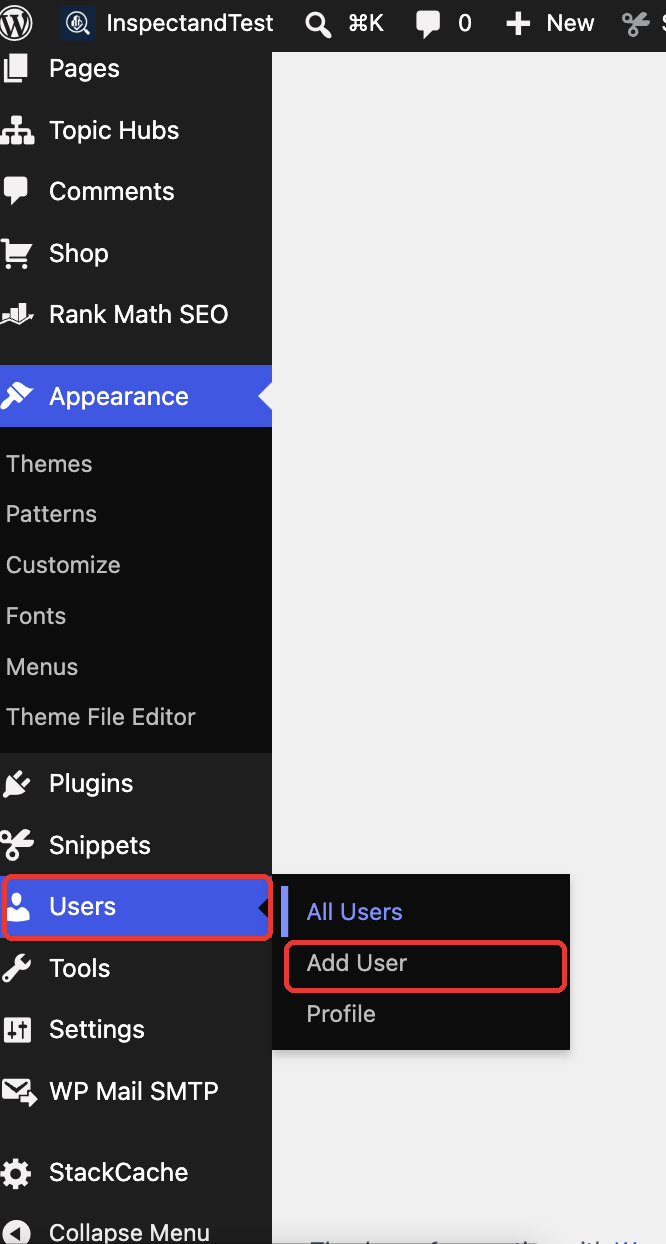
- Ask the agency to log in at yoursite.com/wp-admin, hover over Users in the left menu and click Add User (called Add New on older versions).
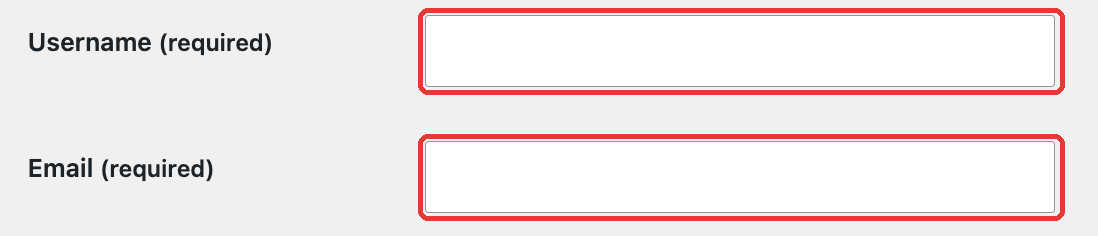
- Enter a username and a company-controlled email address.
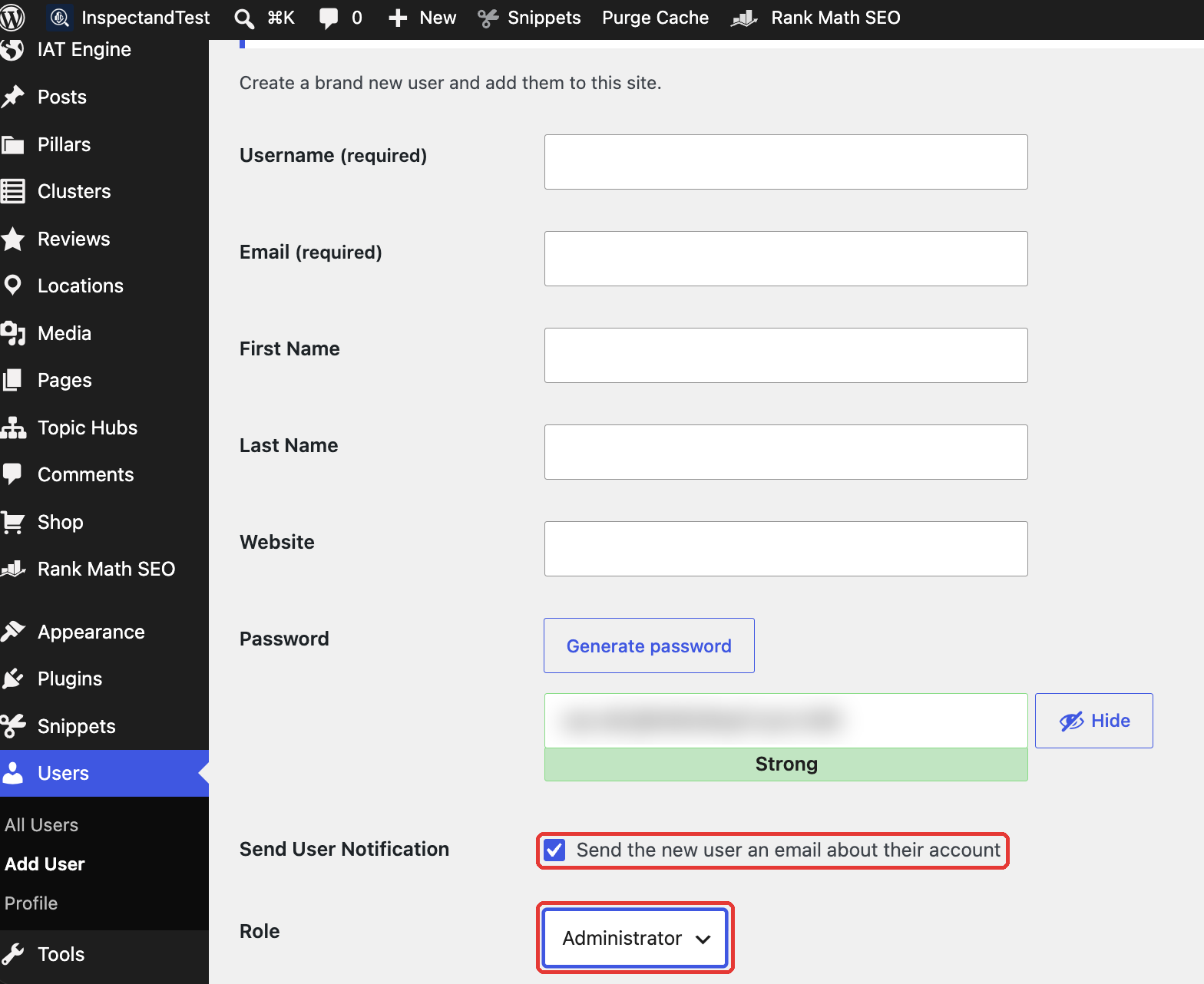
- Leave the generated password, keep Send User Notification ticked so the login details arrive by email, set Role to Administrator, then click Add New User at the bottom of the page. Lower roles cannot install plugins or change site settings. Repeat for a second admin as a backup person.
- Log in yourself, then change the site’s admin email at Settings > General > Administration Email Address. WordPress sends a confirmation link to the new address, and the change only takes effect once it is clicked.
Step 2: Audit plugin and theme licences
Go to Plugins and make a list of every premium plugin and theme (common ones include Elementor Pro, Advanced Custom Fields Pro, Gravity Forms, WP Rocket, Rank Math Pro or Yoast Premium, WPML and premium themes from ThemeForest). For each one, ask: whose account is the licence key under? If it is the agency’s, the key will be deactivated or will simply expire, and you will stop getting security updates. Buy your own licences and replace the keys during the handover window. Expired premium plugins are one of the most common entry points for hacked WordPress sites.
Step 3: Find every connected key and service
Search the WordPress settings, theme options and plugin settings for third-party connections:
- SMTP or transactional email (WP Mail SMTP, SendGrid, Mailgun, Gmail OAuth). If the connection uses the agency’s Gmail or API key, your contact form emails will stop the day it is revoked.
- Google API keys for Maps embeds, reCAPTCHA and Places, which often live in the agency’s Google Cloud project
- Payment gateways (Stripe, PayPal, HitPay) on WooCommerce sites. Confirm the merchant accounts are in your company’s name.
- Form integrations pushing leads to a CRM, Google Sheets or Zapier/Make. Check whose Zapier account runs the automation.
- Backups and security services (UpdraftPlus remote storage, Jetpack, Wordfence, Sucuri) tied to agency accounts
- Application passwords under Users > Profile that let external tools write to your site
Step 4: Remove the agency’s users
Once your new team has full access, delete the agency’s WordPress users. When WordPress asks what to do with their content, choose “Attribute all content to” one of your own users. Do not delete their posts. If posts carry the agency staff member’s name as author, this also fixes your author bylines, which matters for E-E-A-T. Finally, change the passwords of any shared accounts and regenerate the security salts in wp-config.php to log out every existing session.
Step 5: Collect the documentation
Ask for a short technical handover note: child theme customisations, custom code snippets (and where they live, e.g. functions.php versus a snippets plugin), scheduled tasks, staging site location, and any custom post types or fields. Five minutes of documentation now saves your next developer hours of reverse-engineering.
Google Stack: GA4, GTM, Search Console, Ads, Business Profile
Google’s tools all separate ownership from access slightly differently. Here is how to handle each one.
Google Analytics 4
GA4 has accounts, and properties sit inside accounts. Access can be granted at either level, and the highest role is Administrator.
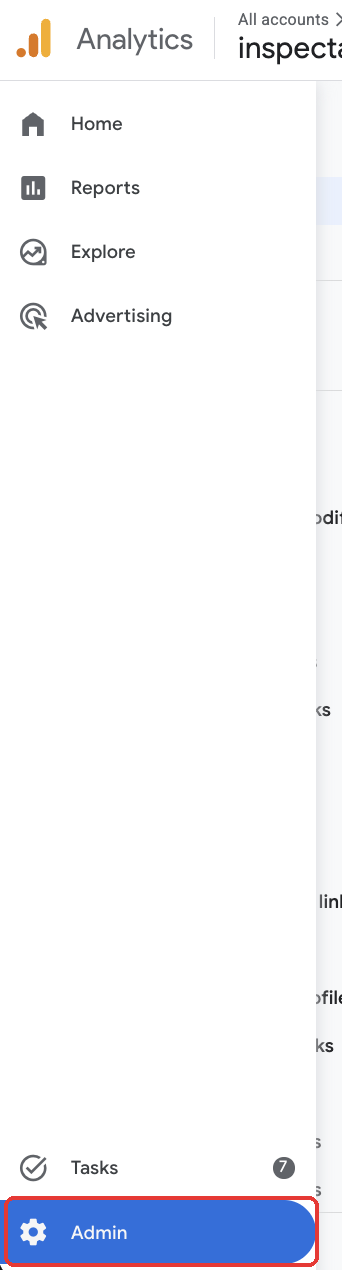
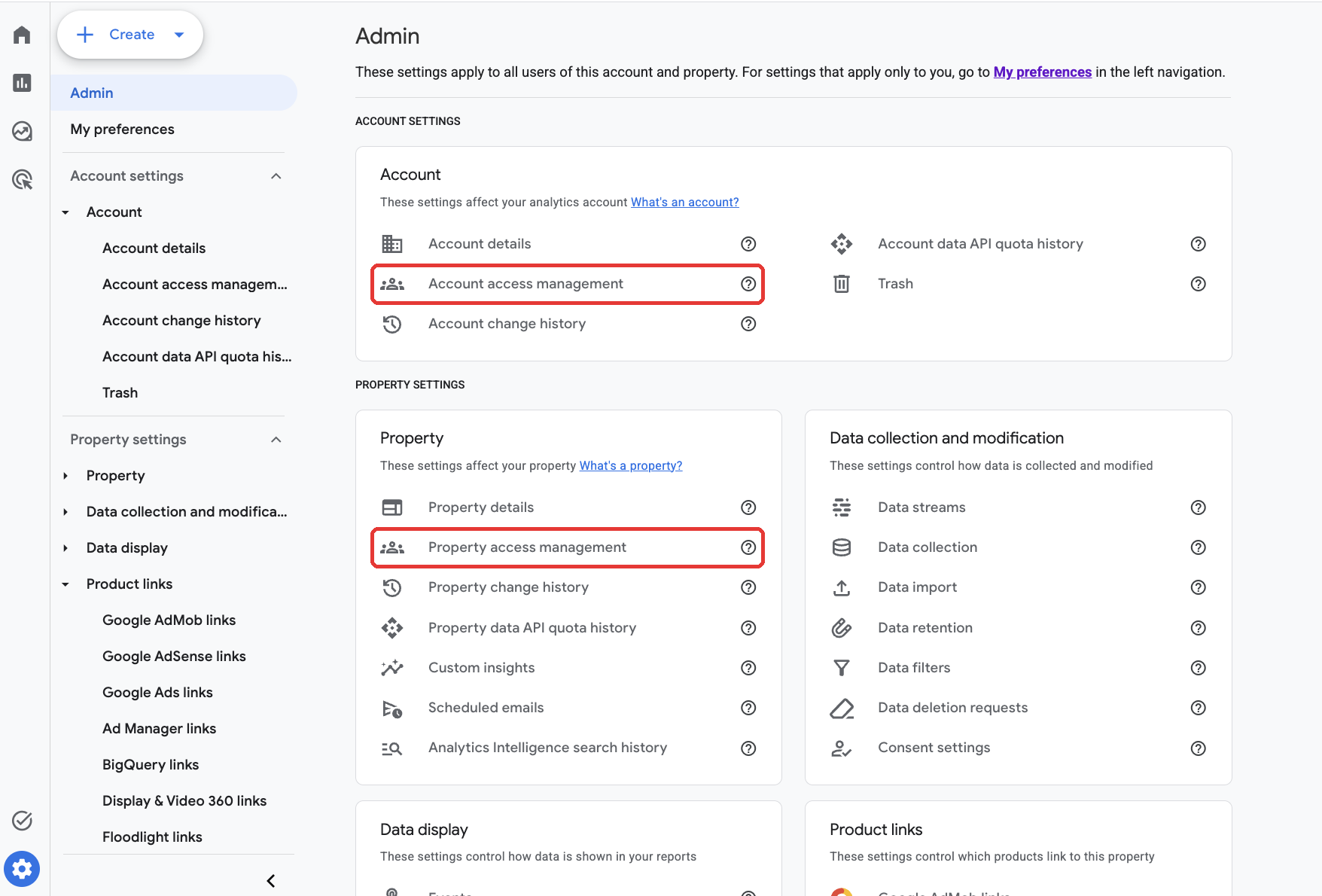
- At analytics.google.com, click Admin (the gear icon, bottom left).
- Click Account access management if it is visible, since access granted there covers every property in the account. Otherwise use Property access management.
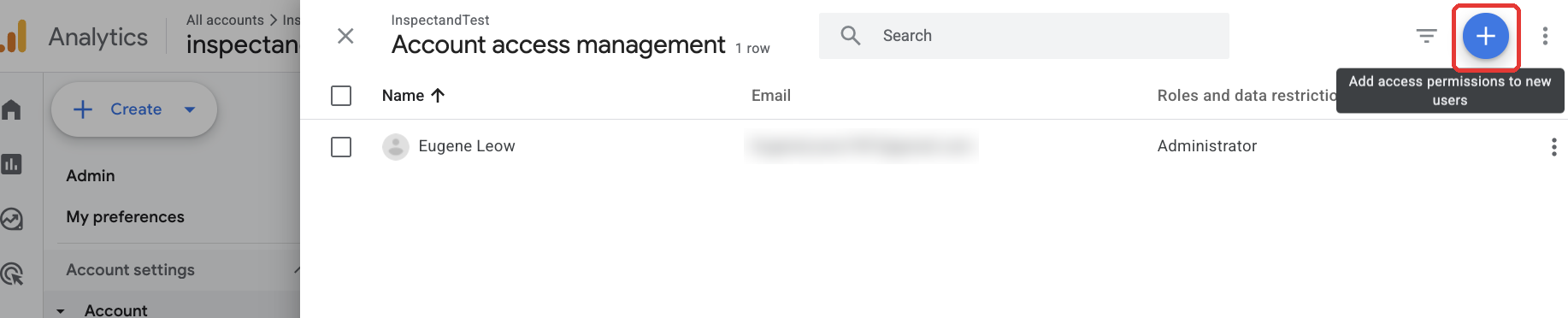
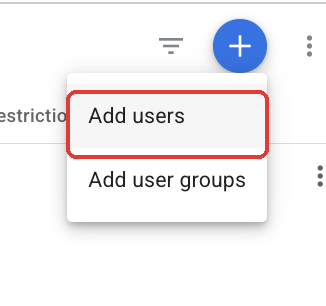
- Click the blue + button at the top right, then choose Add users.
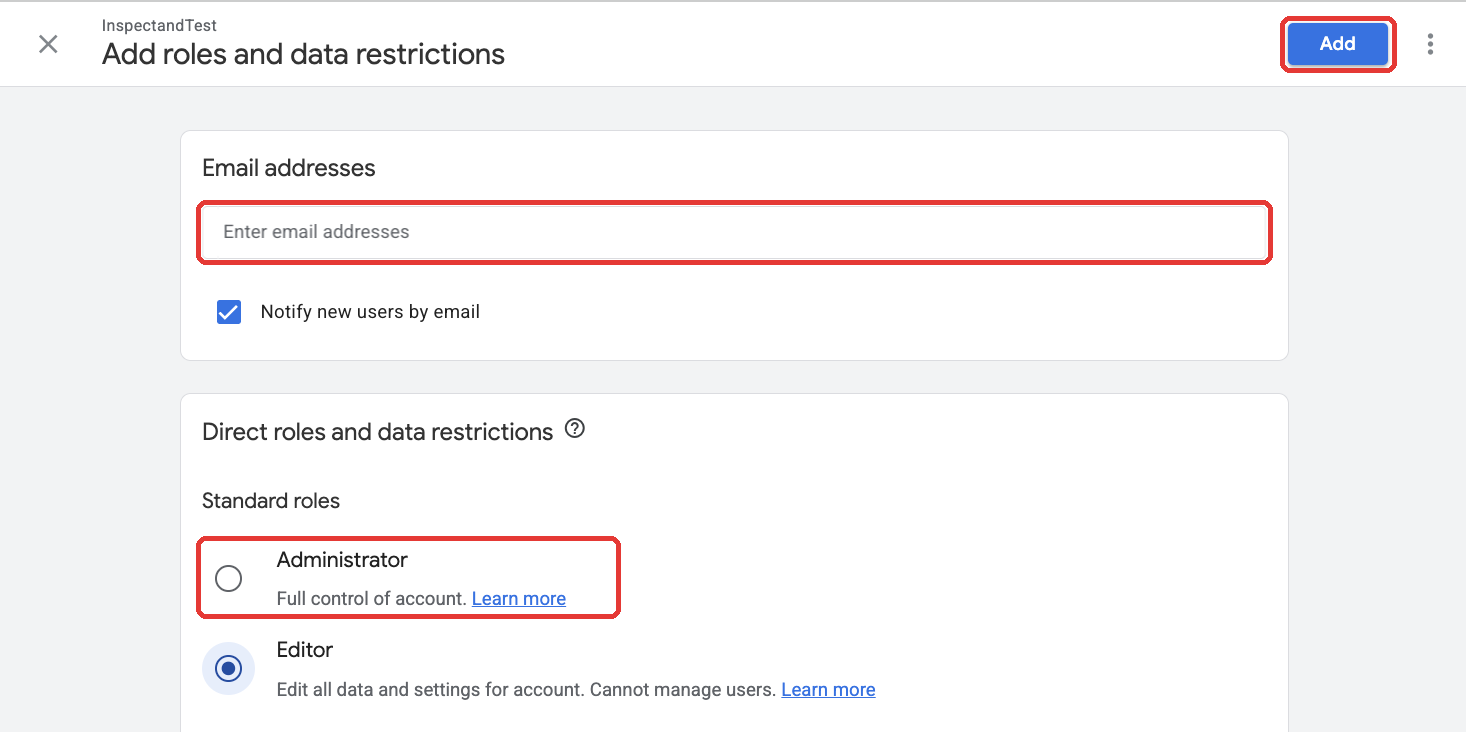
- Enter the company email, keep “Notify new users by email” ticked and select Administrator. Editor is often pre-selected, so change it. Then click Add.
- Check which account the property sits in. If it is inside your own GA account, you are in bucket A. If it sits inside the agency’s account, alongside its other clients, you can be an admin of the property but the account itself is not yours.
- If the property lives in the agency’s account, assume it stays there: Google will not transfer a property to a new owner on request. Create a new property in your own account and replace the tracking tag. Run both in parallel for a few months so you keep historical comparison. Export key historical reports (or set up a BigQuery export if you have not already) because GA4’s standard data retention for event-level exploration data is limited.
- Check links to Google Ads, Search Console and BigQuery under Admin > Product links, and relink them under your accounts if needed.
If Admin shows no access options, your login only has Viewer or Analyst rights, and whoever created the account must make you an Administrator first. New to the interface? Our GA4 guide walks through the admin screens.
Google Tag Manager
- Ask the agency to add you under Admin > User Management at the account level with Administrator account permissions and Publish container permissions.
- Export the container (Admin > Export Container) as a JSON backup, even if you own the account. If the container lives in the agency’s GTM account, you can import this file into a new container in your own account and swap the snippet on the site.
- Review every tag. Remove tags that send data to agency tools you no longer use, such as agency heatmap, call-tracking or reporting tags. They are both a privacy risk and a performance drag.
See our Google Tag Manager tutorial if you need to rebuild tags.
Google Search Console
Search Console is the one Google tool that is easy to recover, because any verified owner sees the full historical data.
- Verify the domain property yourself using a DNS TXT record. Since you now control DNS, you do not need the agency for this.
- Go to Settings > Users and permissions and review the list. Verified owners show the method they used to verify.
- To remove an agency verified owner, delete their verification token first (their HTML file, meta tag or DNS record), then click Unverify. If the token is still present, Search Console simply re-verifies them.
- Remove any delegated owners and full or restricted users from the agency.
To add a person, such as a backup admin or your new agency:
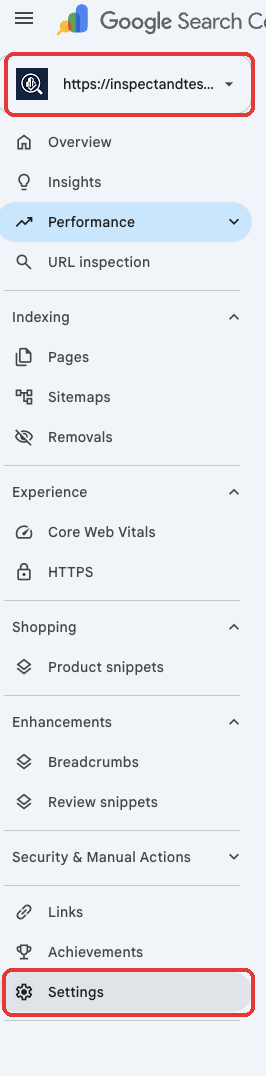
- At search.google.com/search-console, pick the site from the property menu (top left), then click Settings at the bottom of the left menu. If you have both a Domain property and a URL-prefix property, repeat these steps for each, because permissions do not carry across.
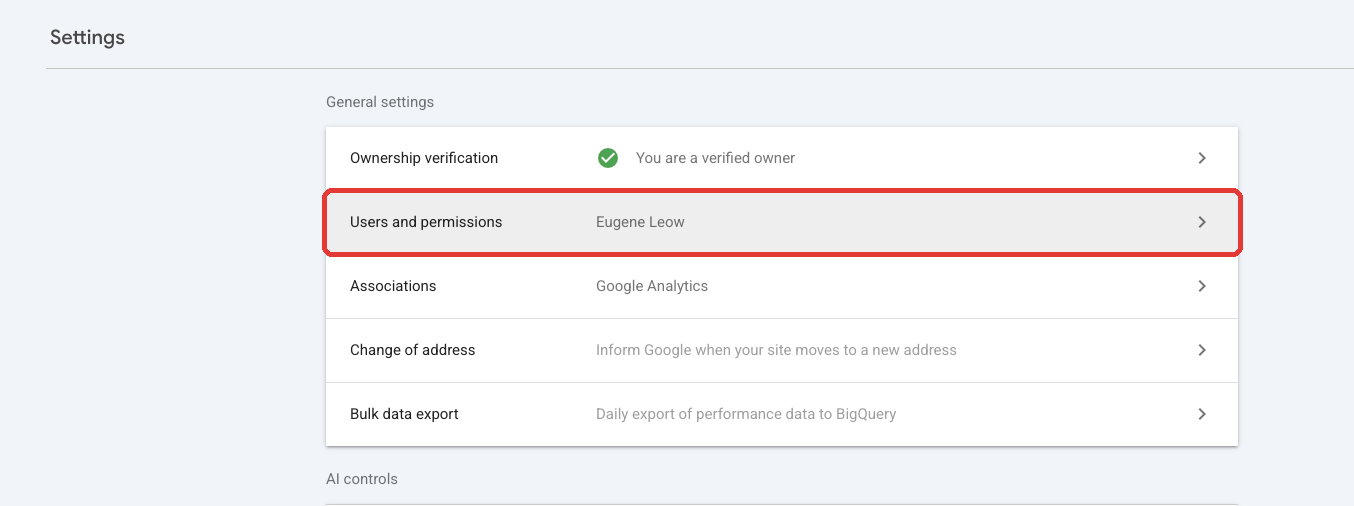
- Click Users and permissions.
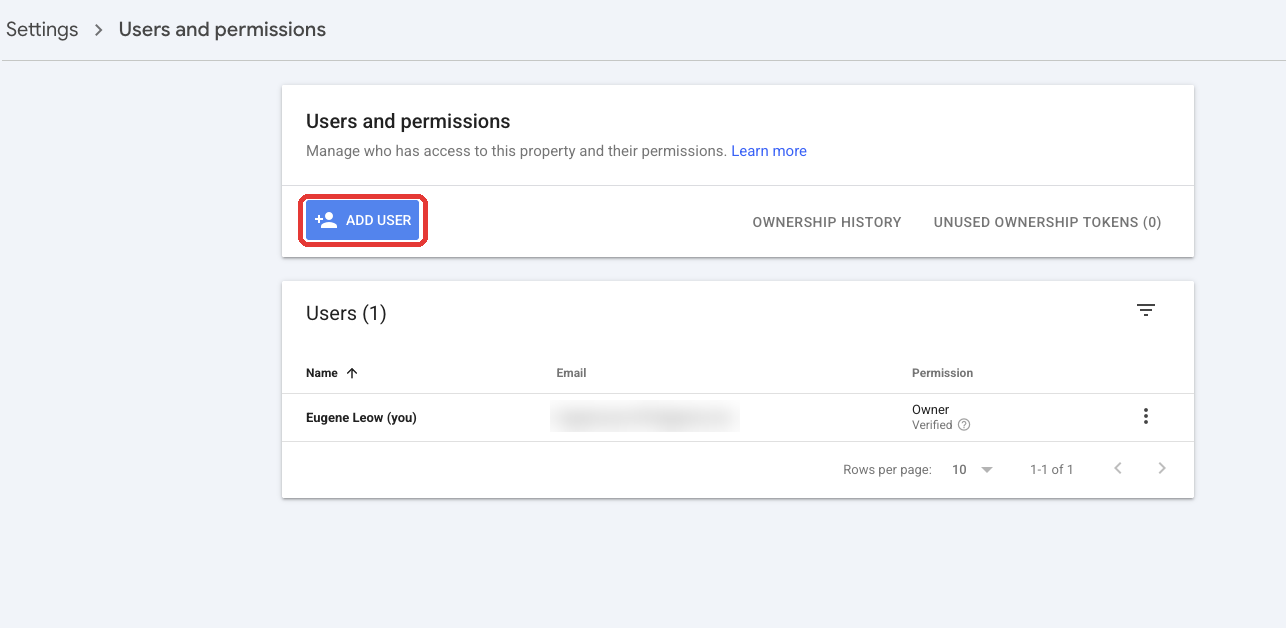
- Click Add user. Only a verified Owner sees this button.
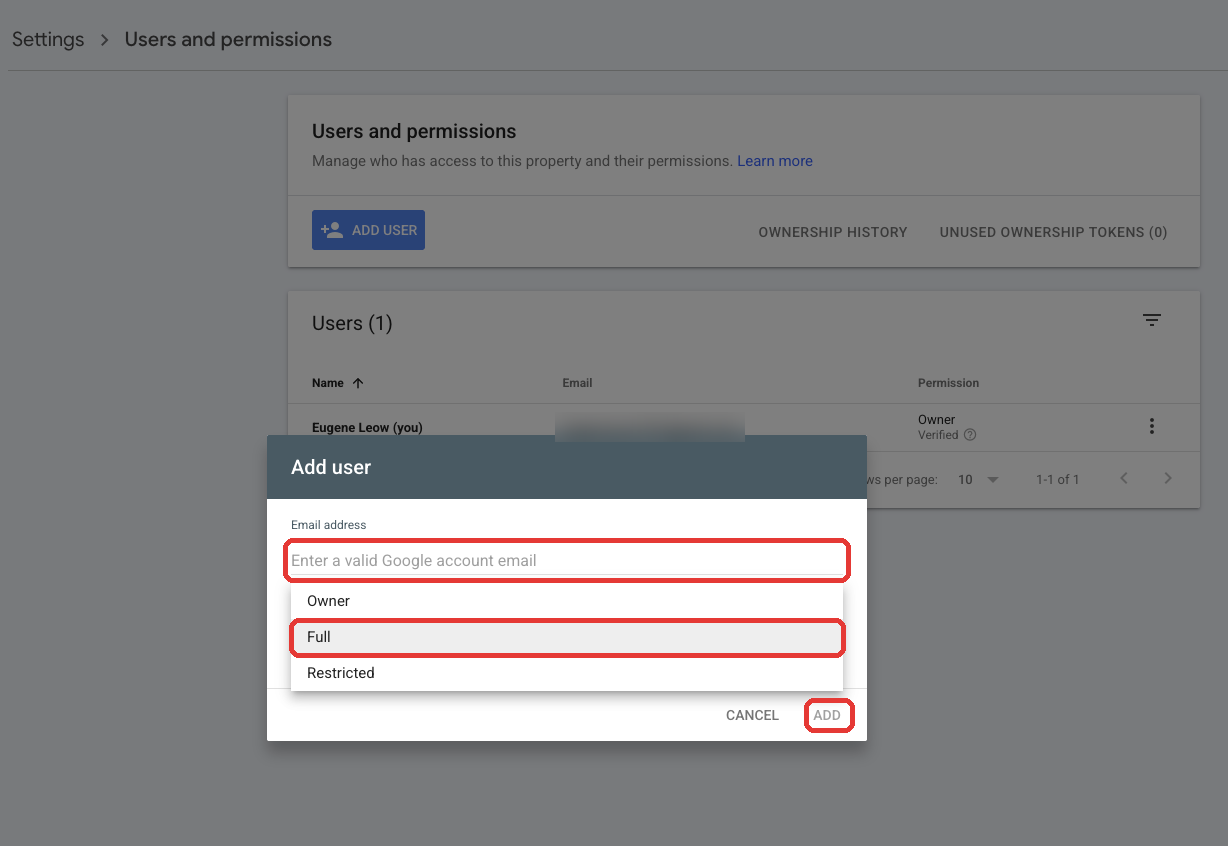
- Enter the email, choose Full (or Owner for a backup admin inside your business), then click Add.
Our Search Console tutorial covers the reports worth watching after a handover.
Google Ads
Google Ads causes the most handover headaches because of manager accounts and billing.
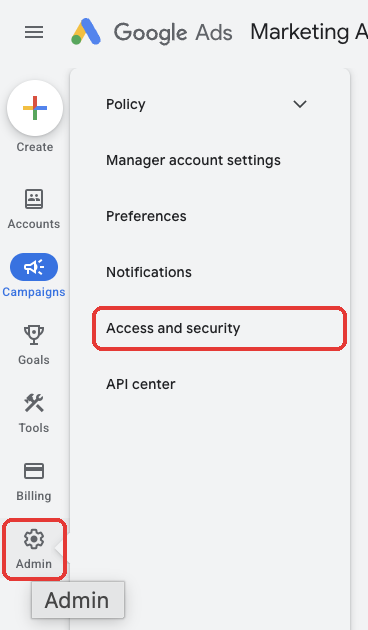
- Get admin access. The agency clicks Admin (the gear icon at the bottom of the left menu), then Access and security.
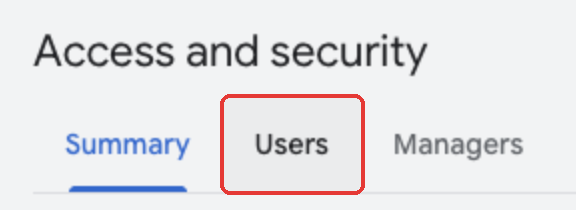
It opens the Users tab and clicks the blue + button.
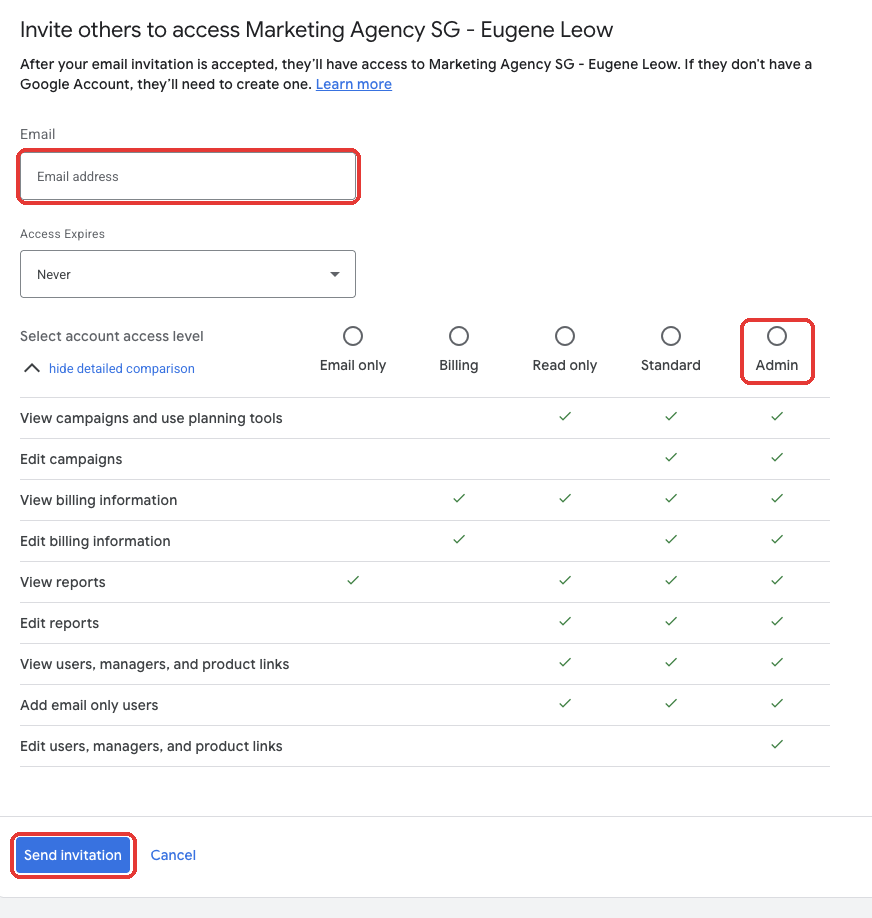
It enters your email, leaves Access Expires as Never, selects Admin and clicks Send invitation. Accept the invite and confirm you can see the account.
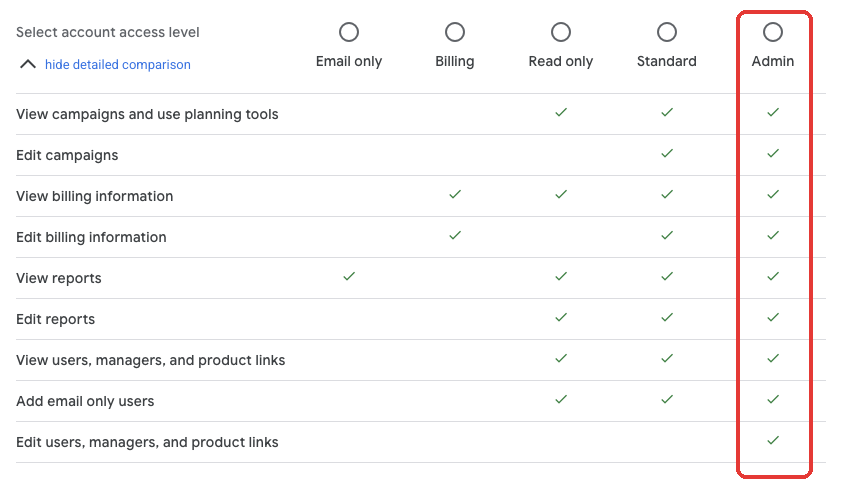
Admin is the only level that can edit users, managers and product links, so nothing less will let you remove the agency later.
- Check the manager (MCC) link. Under Admin > Access and security > Managers you will see the agency’s manager account. Once you are an admin, you can unlink it yourself, but do not do so until billing is sorted. Your new agency will usually send its own manager link request, which you accept on the same Managers tab. Give it your 10-digit customer ID (top right of Google Ads, e.g. 123-456-7890).
- Check billing. Open Billing > Settings and see whose payments profile the account uses. If ad spend is billed to the agency, for example through its monthly invoicing or consolidated billing, the account stops serving when the agency removes its billing setup. Changing the payments profile on an existing account is not always possible, so speak to Google Ads support early. In some cases the practical answer is a new account under your own payments profile, with campaigns copied across.
- Export everything. Download the account (Google Ads Editor makes a full local copy), plus search terms reports, negative keyword lists, audiences and conversion action settings.
- Review conversion tracking. Make sure conversion actions still fire after GTM and website changes. Check for offline conversion imports from your CRM that the agency may have scripted.
- Remove agency users and unlink the manager once the new team or in-house owner is fully set up.
Ad accounts that get suspended during transitions are surprisingly common, because sudden billing or payment changes can trigger reviews. If that happens, see our Google Ads account reinstatement service.
Google Business Profile
Your Google Maps listing is often the biggest source of local leads, and it supports a proper ownership transfer.
- Sign in to the Google account that manages the listing and search your business name on Google. The management panel appears at the top of the results. For several locations, use business.google.com instead. Click the three-dot menu, then Business Profile settings.
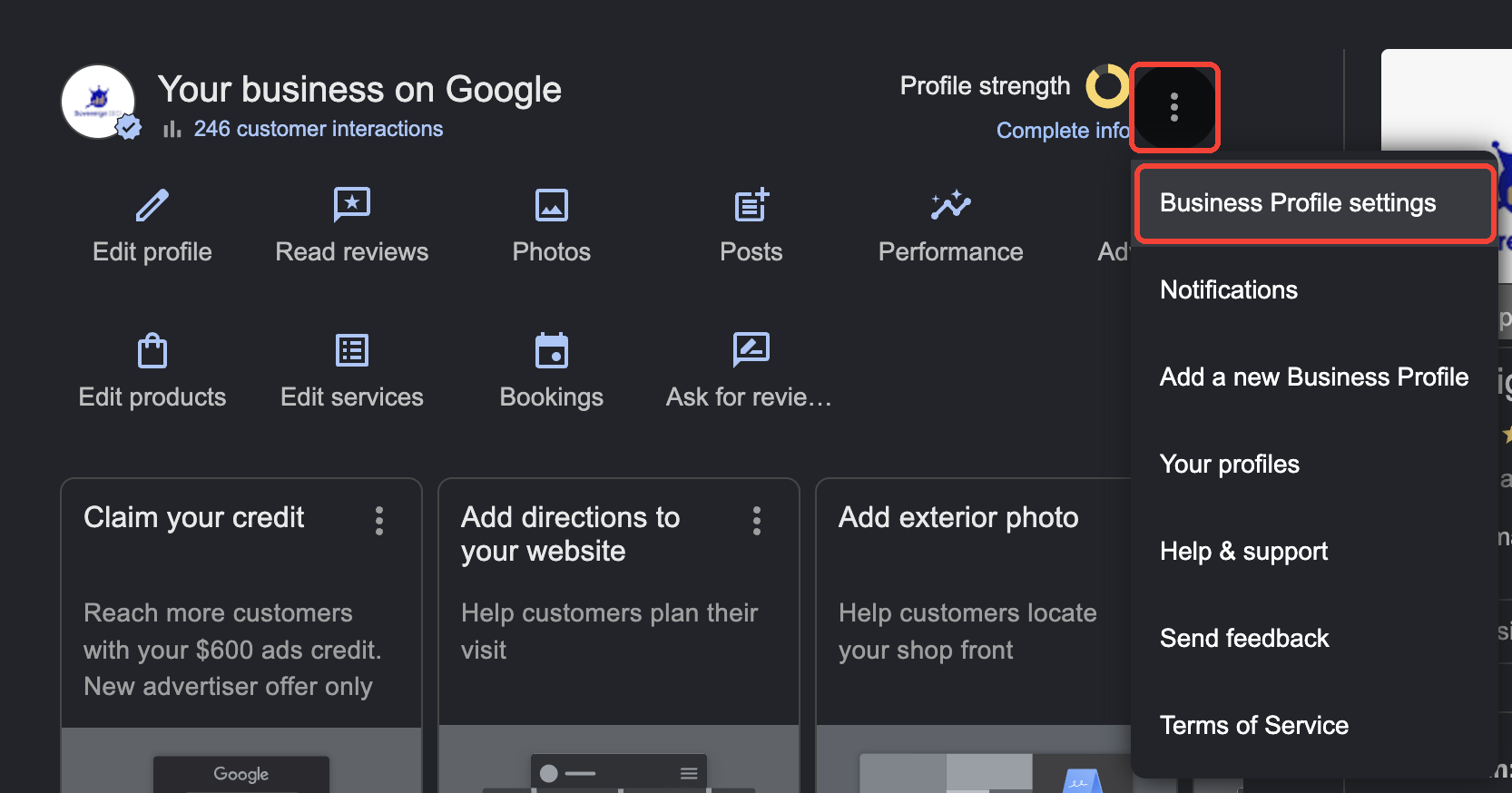
- Click People and access.
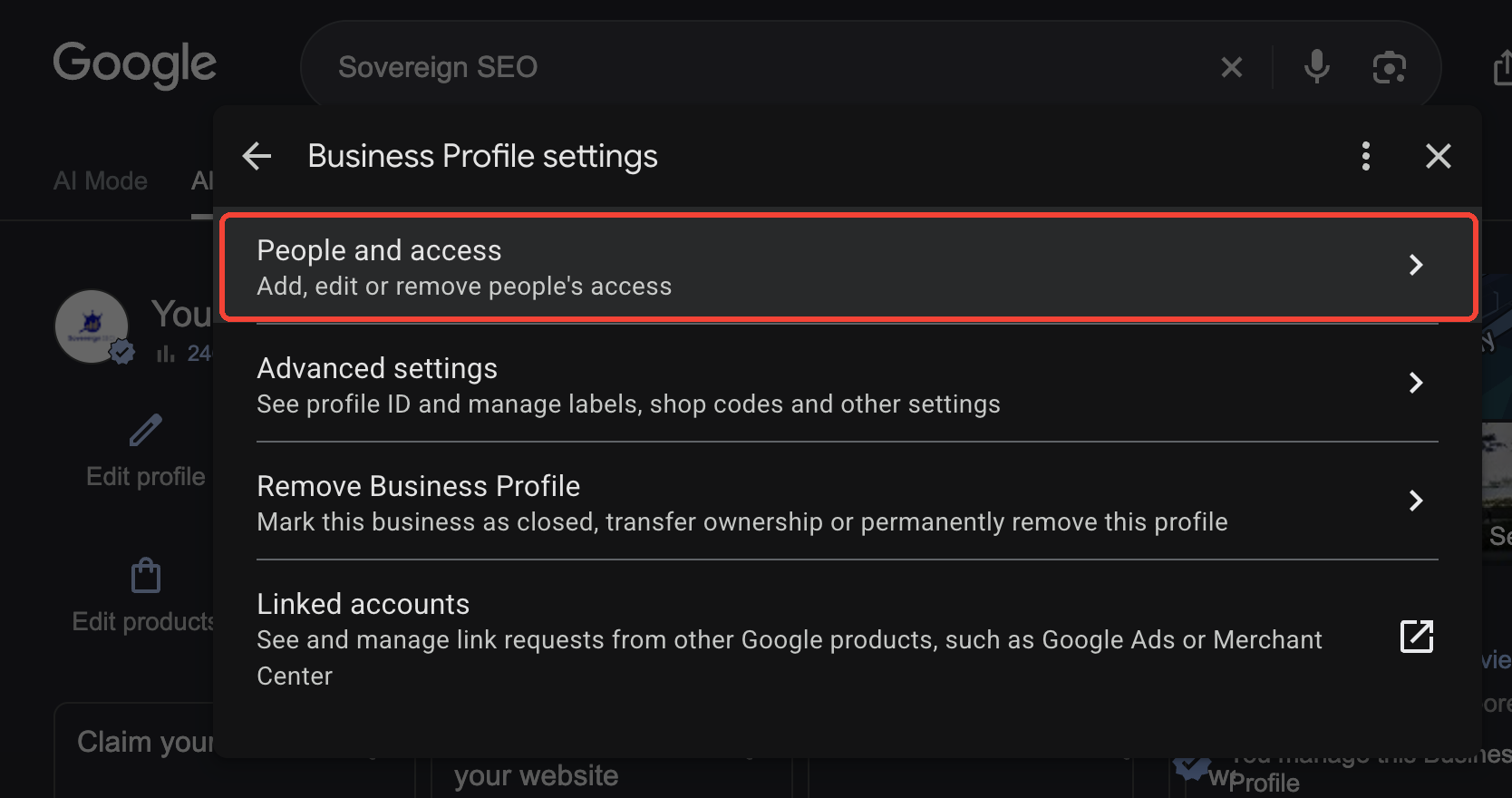
- Click Add.
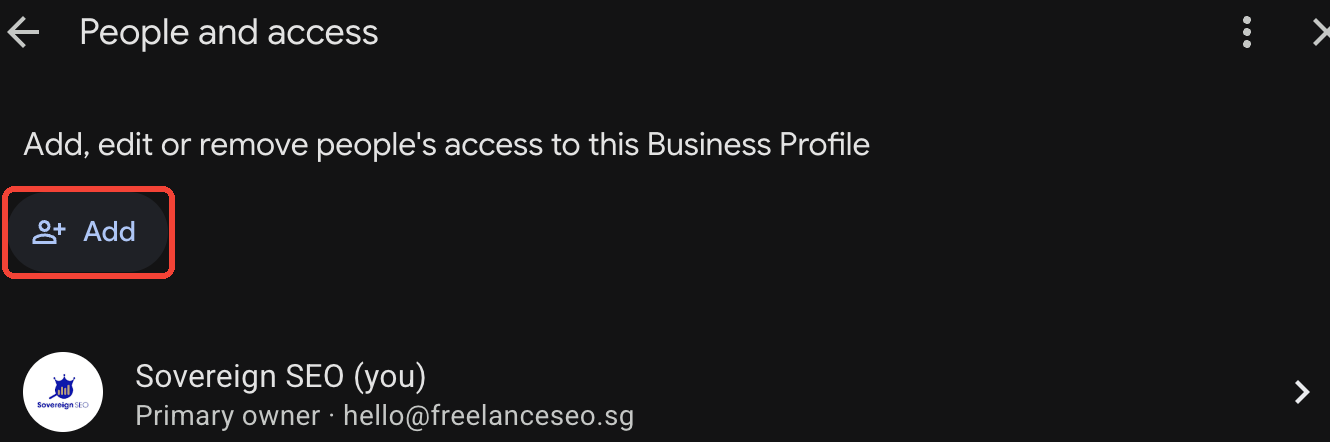
- The agency enters your company email, selects Owner and clicks Invite. (A new agency joining you should get Manager, as shown here. That lets it edit the listing, post and reply to reviews while you stay the owner.)
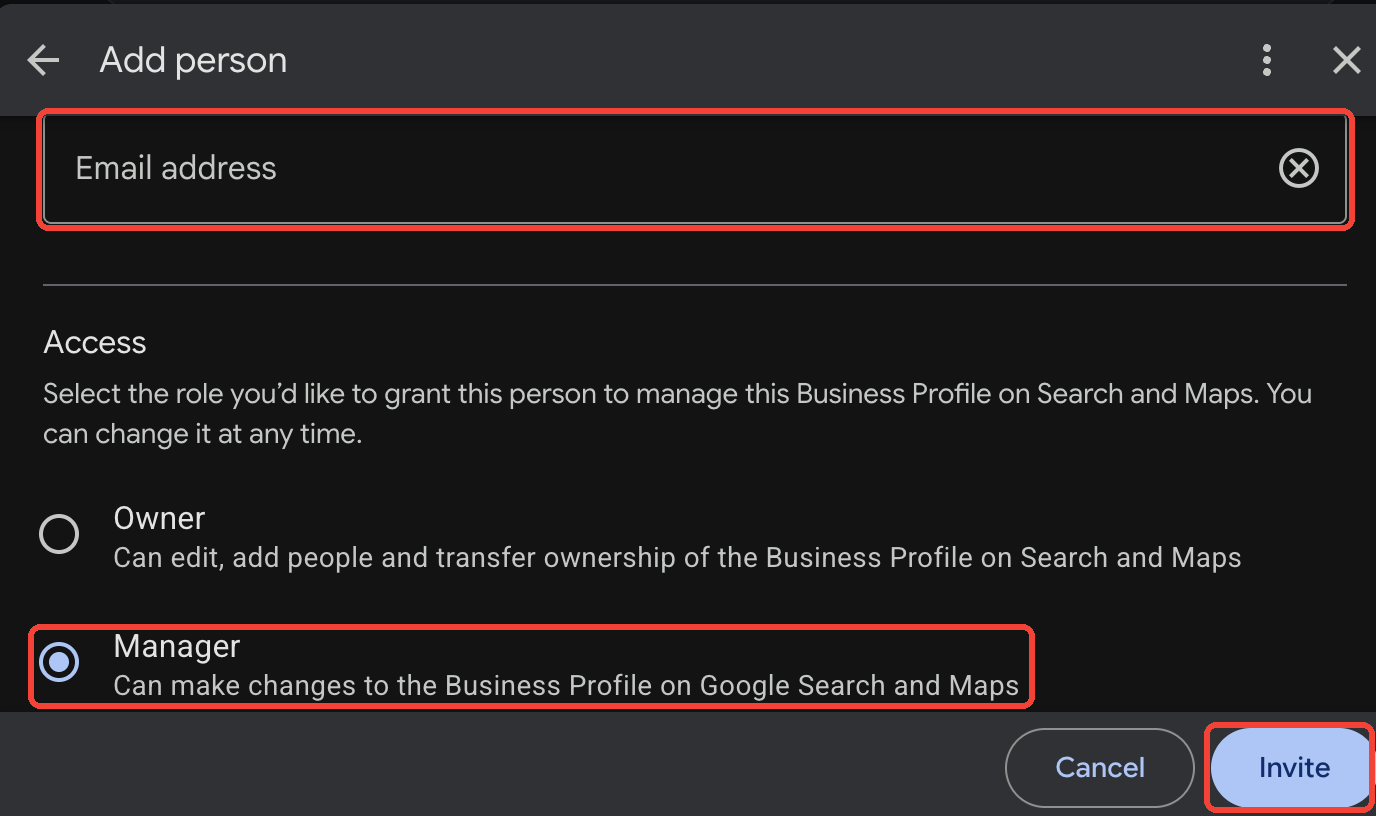
- Once you accept, the agency (if it is the primary owner) uses Transfer ownership to make you the primary owner.
- Remove the agency or downgrade it to Manager if it is still running the account for a transition period.
Because many profiles were verified years ago by a long-departed staff member, also check that the business name, phone, website URL and categories are correct once you have control. Our Google Business Profile tutorial covers optimisation after the takeover. If you see “Own this business?” or “Claim this business” instead of the management panel, your account has no access yet. See the recovery routes below.
Meta: Facebook, Instagram, Ad Accounts and Pixel
Meta organises everything inside Business Portfolios (previously called Business Manager). The crucial question is: which portfolio owns each asset? Assets can be shared to partners, but some can never change owner.

Step 1: Make sure you have your own Business Portfolio
Create one under your company if you do not have one, with at least two admins from your business. Verify the business in the Security Centre if you can, because verification unlocks higher limits and makes recovery easier.
Step 2: Facebook Pages and Instagram
- Pages can change owner. If the agency’s portfolio owns your Page, the agency removes the Page from its portfolio, and you then add it to yours by claiming it. Alternatively, you can request access from your portfolio as a partner.
- Instagram accounts are controlled by whoever has the Instagram login. Make sure the login email and phone belong to your business, change the password, set up two-factor authentication you control, then connect the account to your own portfolio.
Step 3: Ad accounts
An ad account created inside the agency’s portfolio is owned by that portfolio and generally cannot be moved to yours. The agency can only share it with you as a partner. That leaves two options:
- Keep partner access for history and reporting, but create a new ad account in your own portfolio with your own payment method and run all future campaigns there.
- If the account was created in your portfolio and shared with the agency as a partner, simply remove the agency partner. This is the setup you want from now on.
Before switching, export campaign structures, ad creative, audience definitions and performance history from Ads Manager.
Step 4: Pixel (dataset) and Conversions API
The Meta pixel is now part of a dataset in Events Manager. Like ad accounts, a dataset owned by the agency’s portfolio cannot be handed over. It can only be shared. If the agency owns the pixel:
- Create a new dataset in your own portfolio.
- Install the new pixel alongside the old one (via GTM or your platform’s integration) and run them in parallel for a few weeks so the new one builds history.
- Recreate custom conversions, custom audiences and lookalikes on the new dataset. Saved audiences built on the old pixel do not move.
- Reconnect the Conversions API (Shopify, WooCommerce, or server-side GTM) to the new dataset.
- Re-verify your domain in your portfolio and reconfigure Aggregated Event Measurement priorities if applicable.
Our Meta Business Suite tutorial walks through the admin screens.
Step 5: Remove agency people and partners
In Business settings, review People and Partners for every asset. Remove agency staff and the agency partner once your new setup is running.
LinkedIn, TikTok, Email Platforms and SEO Tools
- Company Page: ensure at least two people from your company are Super admins, then remove agency admins under the Page’s admin tools.
- Campaign Manager: ad accounts have roles including Account manager and a single Billing admin. Make your company the billing admin (the role can be transferred) and remove agency users. Export Lead Gen Form responses, which are only downloadable for a limited time.
TikTok
TikTok for Business uses Business Center, which behaves similarly to Meta’s portfolio. Check whether your ad account belongs to your Business Center or the agency’s. If it is the agency’s, request partner access for history, open a new ad account in your own Business Center and move the TikTok pixel and events. Make sure your organic TikTok account login belongs to your business.
Email marketing and CRM
Mailchimp, Klaviyo, HubSpot, ActiveCampaign and similar tools hold your customer lists, which is personal data under the PDPA (more on this below). Get owner or super-admin rights, export the full contact list with consent fields and unsubscribe status, export automation flows and templates, and check that the sending domain authentication (DKIM/SPF) points to an account you own. If you are also changing platforms, read our guide to marketing automation migration before moving lists.
SEO tools, reporting and other subscriptions
- Ahrefs, Semrush and rank trackers: these are usually the agency’s subscriptions. Ask for exports of keyword rank history, backlink lists, keyword research and content plans before access ends.
- Looker Studio dashboards: ask the agency to transfer ownership of each report and data source to your Google account. Otherwise they disappear when the agency deletes its account or removes sharing.
- Call tracking, chat widgets and heatmaps (CallRail, Hotjar, Microsoft Clarity, WhatsApp chat plugins): note whose account each runs on, and whether the tracking phone numbers can be ported to you. If they cannot, swap them before the agency cancels.
- Link-building and PR accounts: list guest posts, directory listings and citations the agency created. Logins for business directories and review platforms should be in your company’s name.
Creative Files, Content and Intellectual Property
Logins are only half of the handover. The other half is the work you paid for.
What to request
- Source files, not just exports: Figma, Adobe (AI, PSD, INDD, Premiere/After Effects project files), Canva team folders, and brand guidelines
- Logo masters in vector format (AI, EPS, SVG) plus colour codes and fonts
- Video footage: raw rushes and final masters, not just compressed social cuts
- Written content: drafts and published versions, content calendars, keyword research, briefs
- Ad creative library: every static, video and copy variation with its performance notes
- Reports and strategy decks from the life of the engagement
- Licences for stock photos, music and fonts used in your assets, along with the licence holder’s name
Who owns the copyright?
This is where many Singapore businesses get caught out. Under the Copyright Act 2021, the default position is that the author (the agency or its freelancers) owns copyright in commissioned works unless the contract says otherwise. The old default for certain commissioned works such as photographs and portraits was removed. So unless your contract has a clear assignment of IP to you on payment, you may only have an implied licence to use what was made.
During the handover, ask the agency to confirm in writing that IP in all deliverables you have paid for is assigned to your company. Also confirm that any third-party material is licensed for your continued use. This matters most for logos and brand identity, so you do not want ambiguity there. If your contract is silent, a short IP assignment letter signed by both parties fixes it. For larger engagements, get legal advice.
Stock licences are not always transferable
If the agency bought stock images or music under its own subscription, the licence usually belongs to the agency. Some licences cover use in client projects indefinitely, others do not. Ask for the licence records. If they are unclear, replace the assets or buy your own licences.
Customer Data and PDPA Obligations
During the engagement, your agency probably processed personal data on your behalf: lead lists, CRM exports, email subscribers, custom audience uploads and form submissions. Under Singapore’s Personal Data Protection Act (PDPA), an agency processing data on your behalf is typically a data intermediary. You, the organisation, stay responsible for that data.
As part of the handover:
- Get the data back. Request a complete export of any personal data the agency holds for you, in a usable format.
- Get deletion confirmed. Data intermediaries are subject to the PDPA’s protection and retention limitation obligations. Ask the agency to delete copies it no longer needs, including those in shared drives, email attachments, ad platform audience uploads in its own accounts and its own CRM, and to confirm deletion in writing.
- Revoke integrations. Cut API keys and webhooks that let agency systems pull data from your CRM, forms or e-commerce store.
- Update your records. Note the change of data intermediary in your data inventory, and update your privacy policy if it names the agency or its tools.
For the wider picture, read our PDPA marketing guide for Singapore. It covers consent, DNC rules and breach notification.
When the Agency Will Not Cooperate
Most agencies hand over professionally. Their reputation depends on it. But if an agency is slow, holds assets hostage over a disputed invoice, or has simply gone out of business, you still have options.
- Domain: if your company is the registrant, contact the registrar directly with proof of company identity (ACRA BizFile extract) to regain access. If the agency registered the domain in its own name, you may need to use the registrar’s or SGNIC’s dispute processes, or legal action.
- Google Business Profile: use the Request access flow on the profile. The current owner has a limited time to respond. If they do not, Google may let you claim the profile after verification.
- Search Console: simply verify the property yourself through DNS. No cooperation is needed, and you get the full history.
- Google Ads: if the account was paid for with your company’s card or billed to your company, Google Ads support can help verify you as the rightful owner. Have invoices and payment records ready.
- Meta: Page ownership can be escalated through Meta’s business support with proof of business ownership. Ad accounts and pixels owned by the agency usually cannot be recovered, so rebuild them.
- GA4 and GTM: if the agency owns the account and refuses access, there is no recovery path for the historical data. Create new ones immediately so your data gap is as short as possible.
- Website: if you have hosting access but not WordPress admin, a developer can create an admin user through the database or WP-CLI. If you have neither, you may need to rebuild from the live site and the Wayback Machine. This is painful, which is why domain and hosting come first.
Here is what each recovery route costs you:
| Platform | Recovery route | What you may lose |
|---|---|---|
| WordPress | Ask your web host to create an Administrator login or reset the admin password. If the agency also controls hosting or the domain, contact the registrar with proof of business ownership. | Nothing, if you can reach the host |
| Google Analytics 4 | Create a new GA4 property under your own Google account and replace the tracking tag. | Historical data stays in the old property |
| Google Search Console | Add the site yourself and verify with a DNS TXT record, then remove the agency’s verification. | Nothing. Data shows as soon as you are verified. |
| Google Business Profile | Search your business on Google and choose Claim this business or Request access. If the owner does not respond, you are usually offered a way to verify yourself. | Nothing. Reviews and history stay with the listing. |
| Google Ads | Contact Google Ads support with proof of ownership (e.g. invoices). If the agency bills through its own payments profile, a new account is often quicker. | Account and Quality Score history if a new account is needed |
| Meta ad account / pixel | Create a new ad account and dataset in your own Business Portfolio. | Ad history, pixel data and pixel-based audiences |
Keep all requests in writing, refer to the contract clauses, and set reasonable deadlines. Where an outstanding invoice is the issue, settling the undisputed portion in exchange for the handover is often cheaper than weeks of downtime.
Post-Handover Audit and Lockdown
Within a week of the cut-over, run this audit to confirm nothing broke and nothing was left open:
- Test every lead path. Submit each contact form, click-to-call and WhatsApp button, and booking widget. Confirm the lead arrives in the right inbox and CRM.
- Check conversion tracking. In GA4 DebugView, Google Ads conversion diagnostics and Meta Events Manager, confirm that key events fire once, not zero times and not twice.
- Check email deliverability. Send test emails to Gmail and Outlook and confirm SPF, DKIM and DMARC all pass.
- Crawl the site for broken links, missing redirects and accidental
noindextags, which are a classic side-effect of staging migrations. - Review all user lists one final time: WordPress, hosting, registrar, DNS, GA4, GTM, GSC, Google Ads, GBP, Meta, LinkedIn, TikTok, email platform, CRM.
- Rotate secrets: hosting, FTP, database, email, API keys, WordPress salts, and any shared password manager vaults.
- Turn on two-factor authentication for every admin account, using company-controlled devices or a shared authenticator in your password manager.
- Write your own access register: a single document listing every platform, the owning account, the admins, the billing method and renewal dates. Update it every time someone joins or leaves.
- Watch performance for 30 days. Compare organic traffic, conversions and cost per lead with the pre-handover baseline. A marketing audit checklist is a good structure for this review.
For Agency Owners: Onboard Clients the Right Way
Every messy handover started as a rushed onboarding. If you run an agency, the cheapest way to earn trust is to make leaving easy: the client owns every account and you are a user they can remove in one click. This is the access request we send new clients. It covers the five platforms most SME engagements need, and none of it requires sharing a password:
| Platform | Role to request | Where the client does it | Who can grant it |
|---|---|---|---|
| WordPress | Administrator | Users > Add User | Any site Administrator |
| Google Analytics 4 | Administrator (or Editor) | Admin > Property access management | A user with the Administrator role |
| Google Search Console | Full user (or Owner) | Settings > Users and permissions | A verified Owner |
| Google Business Profile | Manager (or Owner) | Business Profile settings > People and access | Primary owner or Owner |
| Google Ads | Admin, or accept your manager account link | Admin > Access and security | A user with Admin access |
Practices that prevent the next dispute:
- Never create accounts under your own identity. If a client has no GA4, Google Ads or Business Portfolio yet, have them create it with their company email (or create it with them on a call) and then invite you.
- Prefer a manager account link for Google Ads. Linking the client’s account to your MCC keeps billing on their payments profile, and either side can unlink it.
- Use partner access in Meta. Ask the client to share their Page, ad account and dataset with your Business Portfolio as a partner, rather than you creating assets that you would own.
- Buy plugin licences in the client’s name, or hand the keys over in the contract, so their site keeps getting updates after you leave.
- If the client cannot grant access, it usually means a previous agency still holds ownership. Send them the handover request email above, worded so that ownership moves to the client, not to you.
- Put the exit in the contract. An IP assignment on payment, a handover clause and a PDPA data-return clause make you the easy agency to sign with. See our contract guide.
The Master Agency Handover Checklist
Copy this table into your handover request. Ask the outgoing agency to fill in the “Owner account” and “Status” columns.
| Asset | What you need | Owner account | Status |
|---|---|---|---|
| Domain registrar | Registrant = your company; registrar login or transfer code | ||
| DNS (e.g. Cloudflare) | Zone export; admin access or zone moved to your account | ||
| Hosting | Control panel/SFTP access or full backup (files + DB) | ||
| Business email | Workspace/365 super admin; MX, SPF, DKIM, DMARC records | ||
| WordPress | 2 company admins; admin email changed; agency users removed | ||
| Premium plugins/themes | Licence list; keys replaced with your own | ||
| Integrations | SMTP, reCAPTCHA, Maps API, payment gateway, Zapier/Make | ||
| Google Analytics 4 | Administrator; property location confirmed; Ads/GSC links | ||
| Google Tag Manager | Account admin + publish; container JSON export | ||
| Google Search Console | Self-verified via DNS; agency owners unverified | ||
| Google Ads | Admin access; billing changed; MCC unlinked; Editor export | ||
| Google Business Profile | Primary owner transferred to you | ||
| Meta Business Portfolio | Pages owned; new ad account if needed; agency partner removed | ||
| Meta pixel / dataset | Owned by your portfolio or rebuilt; CAPI reconnected | ||
| Login email/phone and 2FA under company control | |||
| Page super admins; Campaign Manager billing admin; lead exports | |||
| TikTok | Business Center ownership; pixel; organic account login | ||
| Email platform / CRM | Owner rights; full list export with consent status | ||
| Reporting | Looker Studio reports and data sources transferred | ||
| SEO data | Rank history, backlink lists, keyword research, content plans | ||
| Call tracking / chat | Account ownership; numbers ported or replaced | ||
| Creative files | Source files, logo masters, raw footage, brand guidelines | ||
| IP and licences | Written IP assignment; stock/font/music licence records | ||
| Personal data | Data returned; written deletion confirmation (PDPA) | ||
| Documentation | Technical notes, custom code, automations, credentials list |
Looking for a team that sets you up as the owner from day one? We build every account under the client’s ownership and grant ourselves access, so leaving is always one click. Learn more about our approach, or compare the options in agency vs in-house marketing.
Frequently Asked Questions
How long does an agency handover take?
A well-organised handover for a typical SME (website, Google stack, Meta and one email platform) takes two to four weeks. The slowest items are domain transfers, rebuilding non-transferable ad accounts or pixels, and billing changeovers. Start on the day you give notice, not in the final week.
Can my agency refuse to give me my Google Ads account?
If the account was created under your business and billed to you, the agency should not withhold it, and Google Ads support can help you prove ownership. If the agency created the account under its own payments profile and paid for media on your behalf, ownership is less clear. Read your contract, and consider opening a new account if negotiations stall.
Can a Meta ad account be transferred to another Business Portfolio?
Generally no. An ad account belongs to the portfolio that created it and can only be shared with partners. If the agency’s portfolio owns yours, keep partner access for history and create a new ad account in your own portfolio going forward. Pages, by contrast, can be moved.
What happens to my GA4 data if I create a new property?
A new property starts with no history. Keep admin access to the old property for as long as possible, export the key reports, and run both properties in parallel for a few months so you can compare year on year.
Do I own the logo and content my agency created?
Not automatically. Under Singapore’s Copyright Act 2021, the creator generally owns copyright in commissioned work unless there is a written assignment. Check your contract for an IP clause and, if it is missing, ask the agency to sign an IP assignment as part of the handover.
Will switching agencies hurt my SEO?
Changing the agency itself does not hurt rankings. What hurts is what can happen during the handover: hosting migrations without redirects, staging sites leaking noindex tags, lost Search Console access, or expired plugins breaking schema. Follow the order in this guide and monitor rankings for 30 days afterwards.
Should I pay a handover fee?
Some contracts include a transition fee for the agency’s time. That is reasonable for substantial work such as migrating hosting or documenting complex automations. Paying for the return of assets your business already owns is not reasonable. Agree a scope and fee in writing up front.
What should be in a new agency contract to make the next handover easier?
Include clauses stating that all accounts are created under your ownership, that IP in paid deliverables is assigned to you, that the agency will provide handover assistance and an asset inventory on termination, and that it will return and delete personal data in line with the PDPA. Our marketing RFP template includes these as standard requirements.
As an agency, what access should I ask a new client for?
For a typical SEO and paid-search engagement: WordPress Administrator, GA4 Administrator, Search Console Full user, Google Business Profile Manager, and a Google Ads manager account link or Admin user. Add Meta partner access for social campaigns. Ask the client to grant each one from their own accounts, so they keep ownership and never have to share passwords.
My agency is holding my accounts hostage over an unpaid invoice. What can I do?
Separate the disputed amount from the access. Pay any undisputed portion, put your access requests in writing with a deadline, and point to the contract’s termination and handover clauses. Withholding assets your business owns, such as a domain registered in your company’s name, is rarely defensible. Meanwhile, recover what you can without the agency: verify Search Console through DNS, request Google Business Profile access and set up new analytics. For claims up to S$20,000 (or S$30,000 if both parties agree), Singapore’s Small Claims Tribunals are a low-cost option. A lawyer’s letter often resolves larger disputes.
The agency registered my domain in its own name. Can I get it back?
Start with the registrar’s WHOIS or registrant record. If the agency is the registrant, it legally holds the domain, so you need it to agree to a registrant change. Use your invoices to show you paid for the domain on your behalf. If it refuses, dispute processes may apply: SGNIC’s dispute resolution policy for .sg domains, or the UDRP for .com. They have strict criteria, so take legal advice. Ensure every new domain is registered to your company from day one.
The agency is asking for a “release fee” before handing over my accounts. Do I have to pay?
Only if your contract says so. A fee for genuine transition work, such as migrating hosting or documenting automations, can be fair if it was agreed. A fee simply to return accounts created for and paid by your business is not something you should accept without checking the contract. Ask for the fee in writing with the clause it relies on, then decide whether paying is cheaper than rebuilding.
The agency has gone silent or closed down. How do I recover access?
Work through the recovery routes in this guide, starting with the domain registrar and web host, since both will deal with the legal business owner directly. Then self-verify Search Console, request Google Business Profile ownership and contact Google Ads and Meta support with proof of business ownership and payment. If the agency was a company that has been struck off, its accounts cannot respond. Platform support teams and your registrar are your main routes.
What if the agency deletes my website, ad account or data when I leave?
This is why the timeline puts backups first. Before giving notice, ask for (or take) a full website backup, export your Google Ads account with Google Ads Editor, and download key reports. Deliberately destroying a client’s assets may breach the contract and can give you a claim for damages, but prevention is far cheaper than litigation. If your site is already gone, the Wayback Machine and Google’s cache can help you rebuild content.
My old agency still has access after the handover. How do I check?
Review the user lists on every platform in the master checklist, including the less obvious ones: WordPress application passwords, hosting SFTP users, DNS account members, Search Console verification tokens, Meta partners, Google Ads manager links, Zapier connections and API keys. Rotate every shared password. If you see logins or changes after the handover date, document them and raise them in writing. Unauthorised access to computer systems is an offence under Singapore’s Computer Misuse Act.
The agency built my website on its own proprietary platform. Can I move it?
Often not directly. Some agencies use in-house CMSs or locked hosting that cannot be exported. Ask for the content (text, images, URLs and meta data) in a portable format, then rebuild on an open platform such as WordPress, mapping every old URL with 301 redirects to protect your rankings. When hiring your next agency, make “site runs on an open platform you can host anywhere” a requirement.
The agency’s call-tracking numbers are on my ads and website. Will I lose those leads?
Possibly. Tracking numbers usually belong to the agency’s call-tracking account. Before the handover, replace them with your own numbers on the website, Google Business Profile and ad extensions, or ask whether the numbers can be ported to your account. Also update any directory listings that show the tracking number.
Who should hold the master admin accounts in my company?
At least two people, ideally a director and a senior marketing or operations lead, using company email addresses rather than personal Gmail accounts. Store credentials in a company password manager so access survives staff turnover.
Do I need to tell my customers about an agency change under the PDPA?
Usually not, as long as the purposes for which you collected the data have not changed. You do need to make sure the outgoing agency returns or deletes the data, and that your privacy policy stays accurate if it named specific service providers.