
Site Migration SEO Checklist: Migrate Without Losing Rankings
Types of Site Migrations and Their SEO Risk
Not all site migrations carry the same level of SEO risk. Understanding the type of migration you are undertaking is the first step in building an appropriate risk mitigation strategy. Each type involves different technical requirements and different potential failure points.
Domain Migration
Moving from one domain to another — such as from oldbrand.com to newbrand.com — carries the highest SEO risk. You are asking Google to transfer all the trust, authority and ranking signals accumulated on one domain to an entirely different one. Even with perfect redirect implementation, expect a temporary traffic dip of 10 to 30 per cent. Recovery typically takes three to six months for well-executed domain migrations.
Protocol Migration (HTTP to HTTPS)
Moving from HTTP to HTTPS is now considered a routine migration, but it still requires careful redirect mapping. Every HTTP URL must 301 redirect to its HTTPS equivalent. Mixed content issues, where HTTPS pages load HTTP resources, are the most common technical failure in protocol migrations. Google treats this as a site move and will reprocess all URLs.
Platform or CMS Migration
Changing your content management system — from WordPress to a headless CMS, from Shopify to WooCommerce, or from a custom platform to a commercial one — typically changes URL structures, template markup, internal linking patterns and page speed characteristics simultaneously. This type of migration carries moderate to high risk because so many elements change at once.
URL Structure Migration
Restructuring your URLs without changing the domain — such as moving from example.com/category/subcategory/page to example.com/page — requires comprehensive redirect mapping but preserves domain authority. The risk is moderate, concentrated primarily in redirect completeness and internal link updates.
Design and Template Migration
A visual redesign that preserves URLs, domain and platform is the lowest-risk migration type. However, changes to HTML structure, internal linking patterns, content placement and page speed can still affect rankings. Many businesses underestimate the SEO impact of template changes because the URLs stay the same.
Regardless of migration type, partnering with an experienced SEO services team before the migration begins dramatically reduces the risk of avoidable errors.
Pre-Migration Audit and Benchmarking
The pre-migration audit establishes your current baseline and identifies every asset that must be preserved during the migration. Skipping this phase or rushing through it is the single biggest predictor of migration failure.
Crawl the Existing Site
Run a complete crawl of your current site using Screaming Frog, Sitebulb or a similar crawler. Extract every indexable URL, including all status codes, canonical tags, hreflang annotations, structured data, meta tags and internal links. This crawl data becomes your source of truth for redirect mapping and post-migration validation. Export and store this data — you will reference it repeatedly over the following months.
Document Current Rankings and Traffic
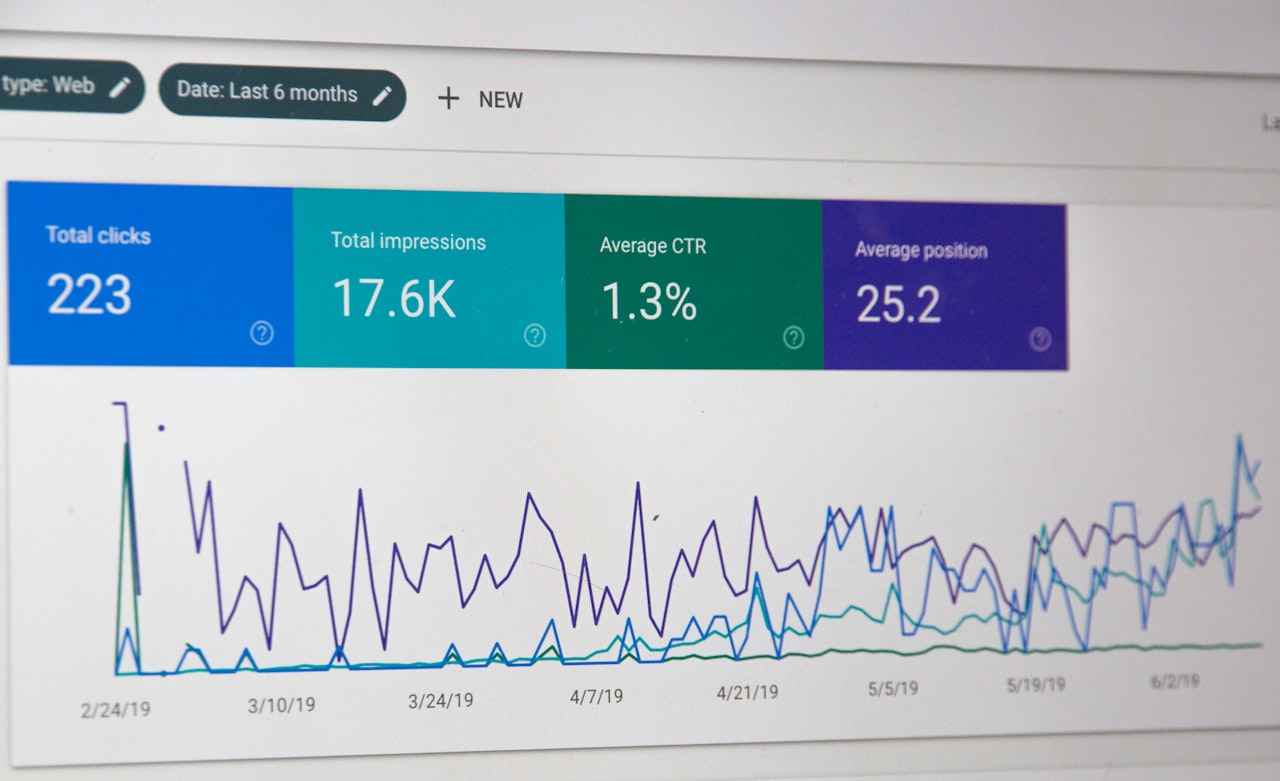
Export your Google Search Console performance data for the past 16 months — this gives you year-over-year comparison data plus a buffer. Record keyword rankings, impressions, clicks, click-through rates and average positions for your top pages. Also export your Google Analytics data, including organic traffic by landing page, conversion rates and revenue attributed to organic search.
Identify High-Value Pages
Not all pages carry equal weight. Identify your top 50 to 100 pages by organic traffic, by backlink count and by revenue contribution. These pages receive the highest priority during redirect mapping, QA testing and post-migration monitoring. A single broken redirect on a high-traffic page can account for a disproportionate share of your total traffic loss.
Backlink Audit
Export your full backlink profile from Ahrefs, Semrush or Majestic. Identify every URL that receives external links. Each of these URLs must have a working redirect in the new site structure. Pay special attention to backlinks pointing to deep pages, resource pages, old blog posts and any URL that has accumulated significant link equity over time.
Index Coverage Report
Review Google Search Console’s index coverage report to understand how Google currently views your site. Note any existing indexing issues, excluded pages and errors. You need to distinguish between pre-existing issues and new issues introduced by the migration — this baseline data is critical for post-migration troubleshooting.
Redirect Mapping and URL Strategy
Redirect mapping is the most labour-intensive and most critical component of site migration SEO. Every old URL that has any value — traffic, backlinks, indexation — must map to the most relevant new URL via a 301 redirect.
Building the Redirect Map
Create a spreadsheet with the following columns: Old URL, New URL, Redirect Type (301), Old Page Title, Old Page Traffic, Old Page Backlinks, Mapping Confidence (exact match, close match, category-level). Start by mapping exact equivalents — pages that exist in both the old and new site structures with the same content. Then map pages that have changed URLs but serve equivalent content. Finally, map discontinued pages to the most relevant alternative page.
One-to-One vs. Many-to-One Redirects
Always prefer one-to-one redirects where an old page maps to a specific equivalent new page. Many-to-one redirects — where multiple old pages all redirect to a single new page, often the homepage — are a significant source of traffic loss. Google treats a redirect to an irrelevant page as a soft 404 and may drop the ranking signals. If a page has no equivalent on the new site, redirect to the closest relevant category or parent page, not the homepage.
Redirect Chains and Loops
Check for redirect chains where URL A redirects to URL B which redirects to URL C. While Google can follow chains of up to about five redirects, each hop introduces latency and some signal loss. Flatten all chains so that every old URL redirects directly to its final destination. Also check for redirect loops, which prevent Googlebot from reaching the target page entirely.
Handling Parameters and Variations
Do not forget to redirect parameterised versions of old URLs. If your old site used URLs like example.com/page?ref=social or example.com/page?utm_source=email, these may be indexed or linked to. Your redirect rules should handle these variations, either through regex patterns or by stripping parameters before applying the redirect logic.
Testing Redirects Before Launch
Set up your redirect rules in a staging environment and test a sample of at least 20 per cent of your redirect map before launch. Use a tool like Screaming Frog in list mode — feed it your old URLs and verify that each one resolves to the correct new URL with a 301 status code and no chains. For high-value pages, test every single redirect manually.
Technical Preparation Checklist
Beyond redirects, several technical elements require attention before migration day.
Robots.txt Configuration
Prepare your new robots.txt file in advance. A common and catastrophic mistake is launching the new site with a staging robots.txt that blocks all crawlers — Disallow: /. Review the new robots.txt to ensure it allows crawling of all intended pages, points to the correct sitemap location and does not carry over any staging-specific rules.
XML Sitemaps
Generate an updated XML sitemap reflecting all new URLs. Submit it to Google Search Console immediately after launch. For the first few weeks post-migration, you can also maintain a sitemap of old URLs that redirect — this helps Google discover and process your redirects faster.
Canonical Tags
Verify that all canonical tags on the new site point to the correct new URLs. A common bug in CMS migrations is canonical tags that still reference old URLs, staging URLs or incorrect protocol versions. Audit canonical tags across your entire new site before launch.
Structured Data
If your old site used schema markup, ensure all structured data is correctly implemented on the new site. Test key pages with Google’s Rich Results Test tool. Migration is an opportunity to improve structured data implementation, but at minimum you must preserve what existed before.
Internal Links
Update all internal links on the new site to point directly to new URLs rather than relying on redirects. While redirects will catch users and crawlers, having internal links that 301 redirect creates unnecessary redirect chains and wastes crawl budget. Run a site crawl against the new site to identify any internal links pointing to old URLs.
A well-structured web design process integrates these technical SEO requirements from the beginning rather than treating them as an afterthought.
Launch Day Execution
Migration launch should be treated with the same rigour as a software deployment. Have a detailed runbook, assign specific responsibilities and establish clear go/no-go criteria.

Timing Your Launch
Launch during your lowest-traffic period — typically midweek, early morning. Avoid launching before weekends, public holidays or peak business periods. For Singapore businesses, avoid launching near Chinese New Year, National Day or other major holidays when your team may not be available for troubleshooting. Allow at least two full business days after launch for intensive monitoring before a weekend.
Launch Day Checklist
Execute and verify the following in order: deploy the new site, activate all redirect rules, verify robots.txt is correct, submit the new sitemap to Google Search Console, verify HTTPS configuration (if applicable), test a sample of high-priority redirects, test key page functionality, verify analytics and tracking codes are firing, verify Search Console verification is intact, check page speed on key pages and confirm no staging environment references remain in the live code.
Immediate Post-Launch Verification
Within the first hour after launch, run a crawl of your top 100 pages to verify they return 200 status codes, have correct canonical tags, render properly and are not blocked by robots.txt. Spot-check your redirect map by testing at least 50 old URLs manually. Check Google Search Console for any immediate crawl errors or security issues.
Rollback Plan
Have a documented rollback plan ready before you launch. If critical issues are discovered — such as widespread 404 errors, broken redirect rules or a robots.txt blocking the entire site — you need to be able to revert within minutes, not hours. Define clear criteria for when a rollback should be triggered and ensure the technical team can execute it quickly.
Post-Migration Monitoring
The weeks following a migration are critical. You need a structured monitoring programme to catch issues early and assess whether the migration is on track.
Week One: Daily Monitoring
Check Google Search Console daily for the first week. Monitor crawl stats (pages crawled per day, response times), index coverage changes, any new crawl errors and search performance trends. A temporary dip in crawled pages per day is normal as Googlebot processes redirects. A spike in crawl errors is not normal and needs immediate investigation.
Weeks Two to Four: Regular Monitoring
Continue checking Search Console every two to three days. Compare weekly traffic against your pre-migration baseline. Focus on your high-value pages — are they maintaining their rankings? Are new URLs being indexed while old URLs are being removed from the index? Use the URL Inspection tool to check the indexing status of key pages.
Months Two to Three: Trend Analysis
By month two, most well-executed migrations will show stabilisation or recovery. Compare month-over-month organic traffic trends. If traffic is still significantly below pre-migration levels after eight weeks, a deeper investigation is needed. Review for missed redirects, canonicalisation issues or technical problems on the new site that may be suppressing rankings.
Ongoing: Redirect Maintenance
Keep your 301 redirects in place for at least one year, ideally permanently. Google’s John Mueller has confirmed that removing 301 redirects too early can cause ranking drops as Googlebot loses the signal connecting old authority to new URLs. Monitor your redirects for any that may have broken due to server changes or configuration updates.
Combining your migration monitoring with ongoing digital marketing performance tracking ensures you have the full picture of how the migration affects your business outcomes.
Traffic Recovery Strategies
Even well-planned migrations can experience traffic drops. If your organic traffic has declined post-migration, work through these recovery strategies systematically.
Redirect Audit
Re-crawl your complete old URL list and verify every redirect is working correctly. Look for 404 errors, redirect chains, loops and redirects pointing to irrelevant pages. Even a small percentage of broken redirects can cause significant traffic loss if they affect high-value pages.
Index Coverage Analysis
Compare the number of indexed pages before and after migration. A significant drop in indexed pages suggests that Google is having trouble processing your new site. Check for noindex tags, canonical tag errors, robots.txt blocks or crawl budget issues on the new site.
Rendering Verification
If your new site uses a different JavaScript framework or rendering approach, verify that Google can fully render your key pages. Use the URL Inspection tool’s live test to see what Googlebot actually sees. JavaScript rendering issues are a common cause of post-migration traffic drops, especially when migrating from server-rendered to client-side rendered architectures.
Content Parity Check
Verify that your new pages contain the same or equivalent content as the old versions. Migrations often introduce unintentional content changes — missing paragraphs, altered headings, removed internal links or changed meta tags. Compare old and new versions of your top pages side by side.
Page Speed Assessment
If your new site is significantly slower than the old one, this can impact rankings. Run Core Web Vitals assessments on key pages and compare against pre-migration benchmarks. Address any significant performance regressions promptly, as paid advertising can provide temporary traffic while you work on organic recovery.
Site Migration Considerations for Singapore Businesses
Singapore businesses face specific considerations during site migrations that are worth addressing separately.

Multilingual Content Migration
Many Singapore sites serve content in English, Chinese, Malay and Tamil. When migrating a multilingual site, each language version requires its own redirect mapping, its own pre-migration audit and its own post-migration monitoring. Hreflang annotations must be updated to reflect new URL structures across all language versions simultaneously — partial updates can break the bidirectional requirement.
Regional Domain Considerations
Singapore businesses expanding regionally may use the migration as an opportunity to restructure for international SEO — adding subdirectories for different ASEAN markets or migrating from a .sg domain to a .com with country subdirectories. These combined migrations (domain plus structure plus internationalisation) are the highest-risk type and require especially thorough planning.
Local Search and Google Business Profile
If your site migration changes your domain or URL structure, update your Google Business Profile listing to reflect the new website URL. Also update all local citations — directory listings, industry association pages, chamber of commerce profiles — to point to the new URLs. For Singapore businesses listed on local directories like SgpBusiness, YellowPages.sg or HungryGoWhere (for F&B), updating these citations is part of the migration checklist.
Compliance and Legal Considerations
Ensure your new site maintains compliance with Singapore’s Personal Data Protection Act (PDPA) requirements. Migration is a good time to audit your privacy policy, cookie consent mechanisms and data collection practices. If your old site had PDPA-compliant notices that do not carry over to the new site, this creates a legal risk separate from the SEO risk.
Frequently Asked Questions
How much traffic loss should I expect from a site migration?
A well-executed migration with comprehensive redirect mapping typically sees a 10 to 20 per cent temporary traffic dip that recovers within two to three months. Domain migrations tend to see larger dips. Poorly planned migrations can lose 50 per cent or more of organic traffic, sometimes permanently if issues are not addressed quickly.
Should I use 301 or 302 redirects during a migration?
Use 301 (permanent) redirects for all migration redirects. A 301 tells search engines that the move is permanent and signals them to transfer ranking signals to the new URL. 302 (temporary) redirects do not reliably pass link equity and should only be used if the old URLs will eventually return — which is not the case in a migration.
Can I change my URL structure and redesign my site at the same time?
While technically possible, migrating multiple elements simultaneously increases complexity and makes it harder to diagnose issues. If possible, separate the changes: complete the URL migration first, stabilise, then launch the redesign. If you must combine them, increase your QA and monitoring intensity proportionally.
How long should I keep 301 redirects in place after migration?
Keep them permanently if possible. At minimum, maintain redirects for one year. Google’s documentation and John Mueller’s public statements consistently recommend keeping redirects in place indefinitely. The server resource cost is negligible compared to the risk of losing ranking signals.
What if I cannot create one-to-one redirects for all pages?
For pages with no equivalent on the new site, redirect to the closest relevant parent or category page. If even that is not possible, a redirect to a relevant section page is better than the homepage. Pages redirected to the homepage will likely be treated as soft 404s by Google, meaning the ranking signals will be lost regardless.
Should I update my backlinks to point to the new URLs?
While not strictly necessary if your redirects are working, updating high-value backlinks to point directly to new URLs removes the redirect hop and ensures maximum signal transfer. Contact webmasters of your most important referring domains and request link updates. Focus on your top 20 to 30 backlinks by domain authority.
How do I handle a migration if my old site is on a subdomain?
Treat a subdomain-to-subdirectory migration (or vice versa) as a domain migration from Google’s perspective. Full redirect mapping is required. Use the Change of Address tool in Google Search Console if it is available for your property type. Monitor both the old and new properties in Search Console during the transition period.
What should I do if traffic has not recovered after three months?
Conduct a comprehensive post-migration audit: re-crawl all old URLs to verify redirects, check index coverage for errors, verify rendering of key pages, compare content parity between old and new versions, assess page speed differences and review internal linking changes. The issue is almost always one of these elements. If you cannot identify the problem internally, engage a specialist SEO audit service for an independent assessment.
Is it safe to migrate during a Google algorithm update?
It is best to avoid launching a migration during a known core algorithm update or the weeks immediately following one. The volatility from an algorithm update makes it difficult to distinguish migration-related traffic changes from algorithm-related changes. Monitor Google’s search status dashboard and SEO news sources for update announcements before finalising your launch date.
Do I need to resubmit my disavow file after a domain migration?
Yes. If you have an active disavow file for your old domain, you need to submit a new disavow file for your new domain in Google Search Console. The disavow file is tied to the specific property, so it does not transfer automatically during a domain migration.