
Website Redesign Planning Guide: A Step-by-Step Approach for 2026
When to Redesign Your Website
Website redesign planning should begin with a clear understanding of why a redesign is necessary. Not every website problem requires a full redesign — some can be solved with targeted improvements to specific pages or sections. A redesign is a significant investment in time and money, and launching one without clear objectives is a common and expensive mistake.
There are several legitimate triggers for a website redesign:
- Poor performance metrics — high bounce rates, low conversion rates, and declining organic traffic that cannot be fixed through incremental changes
- Outdated technology — the site runs on a platform that no longer receives updates, lacks security patches, or cannot support modern functionality
- Business changes — your company has evolved and the website no longer reflects your current services, brand identity, or market positioning
- Mobile experience failures — the site was not built with a mobile-first approach and delivers a poor experience on phones and tablets
- Competitive pressure — competitors have significantly better websites that are winning customers who would otherwise choose you
- Accessibility gaps — the site does not meet current accessibility standards, creating both legal risk and excluded audiences
What is not a good reason for a redesign: “The website looks dated.” Visual refresh alone rarely justifies the cost and risk of a full redesign. If the site is performing well but looks tired, a design refresh — updating colours, typography, imagery, and layout within the existing structure — is usually sufficient and far less disruptive.
Before committing to a redesign, audit your current website’s performance thoroughly. Understand what is working and what is not. The pages that rank well and convert visitors are assets you need to protect, not discard. Understanding your likely website costs in Singapore will help you budget appropriately for the scope of work required.
The Discovery Phase
The discovery phase is the most important stage of website redesign planning. Decisions made here determine whether the project succeeds or fails. Rushing through discovery to get to the “exciting” design phase is the most common reason redesigns deliver disappointing results.
Stakeholder interviews. Talk to everyone who has a stake in the website — marketing, sales, customer service, leadership, and operations. Each department has different needs and different frustrations with the current site. Sales wants better lead generation. Customer service wants to reduce support calls through better self-service content. Leadership wants the brand to look premium. These needs must be documented, prioritised, and reconciled.
Analytics audit. Review at least twelve months of website analytics data. Identify your highest-traffic pages, your best-converting pages, your most popular entry points, and your highest-exit pages. This data tells you what users actually do on your site, which is often very different from what you assume they do.
Key questions your analytics audit should answer:
- Which pages drive the most organic search traffic?
- Which pages have the highest conversion rates?
- Where do users drop off in your conversion funnel?
- What devices and browsers do your visitors use?
- Which content is most engaged with (time on page, scroll depth)?
- What are the top search queries driving traffic to your site?
User research. Talk to your actual customers. Ask how they found your website, what they were looking for, whether they found it easily, and what frustrated them. Even five user interviews can reveal insights that no amount of analytics data will surface.
Competitor analysis. Review the websites of your top five competitors. Note what they do well and where they fall short. This is not about copying — it is about understanding the baseline expectations in your industry and identifying opportunities to differentiate.
Technical audit. Assess the current state of your website’s technical health. Page speed, mobile usability, crawl errors, broken links, security certificates, and hosting performance all need evaluation. Some of these issues may be fixable without a redesign; others may require architectural changes that only a redesign can address.
Information Architecture and Wireframing
Information architecture (IA) defines how content is organised and how users navigate through your website. Getting the IA right is essential — a beautiful design built on poor architecture results in a frustrating user experience.
Start with user needs, not your org chart. The most common IA mistake is structuring the website around internal departments rather than user tasks. Your visitors do not care about your organisational structure. They care about finding what they need quickly. Organise your navigation around the tasks users want to accomplish: “Learn about our services,” “See our work,” “Get a quote,” “Contact us.”
Plan your URL structure early. Your URL structure should be logical, hierarchical, and permanent. Plan it during the IA phase, not as an afterthought during development. Every page needs a clear, descriptive URL that reflects its position in the site hierarchy. This structure affects both SEO and user experience.
Create a comprehensive sitemap. Map every page that will exist on the new website. Include page names, URLs, parent-child relationships, and the purpose of each page. This sitemap becomes the blueprint for the entire project — designers, developers, content writers, and SEO specialists all reference it.
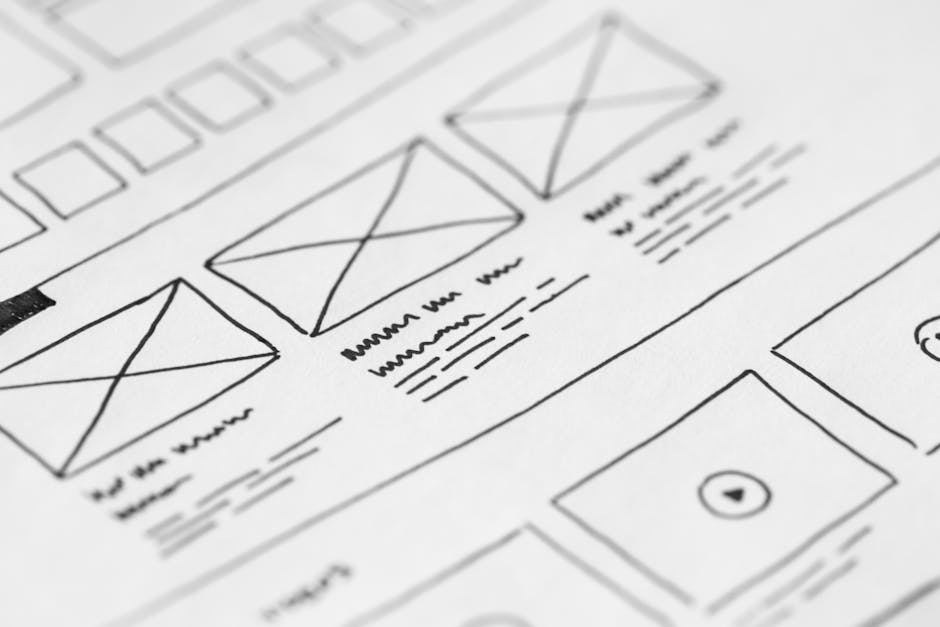
Wireframe key page templates. Wireframes are low-fidelity layouts that define the structure and content hierarchy of each page type without visual design. You need wireframes for each unique page template: homepage, service page, about page, blog post, contact page, and any other distinct layouts. Wireframes should be reviewed and approved before any design work begins.
Investing in proper user experience design during this phase prevents costly revisions later in the project when changes become exponentially more expensive.
Test your IA before designing. Card sorting exercises and tree testing can validate your information architecture with real users. These quick, low-cost research methods reveal whether your proposed navigation makes sense to people who are not intimately familiar with your business. A navigation structure that seems obvious to you may be confusing to someone encountering your business for the first time.
Content Strategy for a Redesign
Content is frequently the bottleneck in website redesign projects. Design and development proceed smoothly, but the project stalls because content is not ready. Treat content as a parallel workstream that begins during discovery and runs alongside design and development.
Conduct a content audit. Catalogue every piece of content on your current website. For each item, decide: keep as is, revise, merge with another page, or remove. This audit is labour-intensive but essential. It prevents valuable content from being lost during migration and identifies gaps that new content needs to fill.
Define your content requirements. For each page in your sitemap, define what content is needed: headline, body copy, calls to action, images, videos, testimonials, technical specifications, or downloads. Create a content brief for each page that your writers can work from.
Write content before design is finalised. Content should drive design, not the other way around. Designing a page layout before the content exists results in either content that is forced to fit an arbitrary layout or a design that needs to be reworked once real content is available. Start writing your most important pages — homepage, key service pages, about page — as early as possible.
Maintain your brand voice. A redesign is an opportunity to refine your messaging, but it should not result in a completely different tone. If your current website’s voice resonates with customers, preserve its core qualities while improving clarity and consistency. If the voice needs to change, document the new tone of voice guidelines so all content is consistent.
Plan for ongoing content. Your redesigned website needs fresh content after launch, not just at launch. Plan your blog calendar, resource library, and case study pipeline. A beautiful new website that goes stale within months wastes much of the investment.
Design and Development
With discovery complete, IA defined, and content underway, the design and development phase can proceed efficiently. Clear preparation in earlier phases prevents the constant revisions that derail redesign projects.
Design system first, pages second. Begin by establishing a design system: typography, colour palette, button styles, form elements, spacing rules, and component patterns. This system ensures visual consistency across every page and makes the development phase more efficient. A design system also makes future updates easier because changes to a component automatically apply across the site.
Mobile-first design is mandatory. In Singapore, mobile devices account for the majority of web traffic across most industries. Design for mobile screens first, then expand the layout for tablet and desktop. This approach ensures the mobile experience is not a compromised version of the desktop site but a primary consideration.
Prioritise page speed from the start. Design decisions directly affect performance. Heavy animations, oversized hero images, custom fonts loaded in multiple weights, and complex layout effects all add to page load time. Make performance a design constraint, not an afterthought. Set a page weight budget and hold the design team accountable to it.
Development should follow a staging process. Build the site on a staging environment that is not accessible to search engines. Use a robots.txt directive to block crawling on the staging domain. This prevents Google from indexing incomplete pages or conflicting with your live website. Professional web design services follow this practice as standard.
Implement structured data and analytics from the start. Do not treat tracking and structured data as post-launch tasks. Implement Google Analytics, Google Tag Manager, conversion tracking, and schema markup during development so they can be tested before launch.
SEO Preservation During Redesign
The single greatest risk in any website redesign is losing organic search traffic. Businesses that have spent years building their search rankings can see that work destroyed overnight by a poorly executed migration. SEO preservation is not optional — it is essential.
Map every existing URL to its new equivalent. Create a comprehensive redirect map that lists every URL on your current site and its corresponding URL on the new site. Every old URL must either remain the same or redirect (301 redirect) to the correct new URL. Missing redirects result in 404 errors, which lose both the traffic and the search ranking equity those pages had built.
Preserve on-page SEO elements. Title tags, meta descriptions, heading structures, and content that has been optimised for specific keywords should be maintained or improved during the redesign. Do not let a designer or developer strip these elements in favour of a “cleaner” look. They exist for a reason.
Maintain internal linking structures. If your current site has effective internal links between related pages, preserve those relationships in the new design. Internal links pass authority between pages and help search engines understand your site’s structure.
Keep high-performing content intact. Pages that rank well and drive organic traffic should not be dramatically altered without careful consideration. If a page ranks on the first page of Google for a valuable keyword, changing its content, URL, or structure is a risk. Make only necessary improvements, not changes for the sake of change.
Our website migration SEO checklist provides a comprehensive framework for preserving search rankings during a redesign.
Submit the new sitemap immediately after launch. Once the new site is live, submit an updated XML sitemap through Google Search Console. This prompts Google to crawl and index your new pages as quickly as possible.
Content Migration
Content migration is the process of moving content from your old website to your new one. It is tedious, detail-oriented work, and cutting corners here leads to broken pages, missing content, and frustrated users.
Automate where possible, but verify manually. If you are moving between similar content management systems, automated migration tools can transfer content in bulk. However, automated migration often introduces formatting errors, breaks links, and loses media files. Every migrated page must be manually reviewed to ensure content integrity.
Prioritise your highest-value pages. Migrate and verify your most important pages first — homepage, top service pages, highest-traffic blog posts, and key landing pages. If issues arise during migration, you want them identified on critical pages early, not discovered on launch day.
Handle media files carefully. Images, PDFs, videos, and downloadable files all need to be migrated. Check that file URLs are consistent or properly redirected. Broken image links and missing downloads are common post-migration issues that damage user experience and credibility.
Preserve metadata. Title tags, meta descriptions, alt text, and structured data must all be migrated along with the visible content. These elements are invisible to users but critical for SEO. A common migration error is transferring body content while leaving metadata blank or populated with placeholder text.
Test all forms and interactive elements. Contact forms, quote request forms, newsletter sign-ups, and any other interactive elements must be tested on the new site. Confirm that form submissions reach the correct email addresses or CRM systems. A non-functional contact form on a newly launched website loses leads during the period when you are most eager to demonstrate the new site’s value.
Testing and Launch Checklist
A thorough pre-launch testing process is the last line of defence against a problematic redesign launch. Use this checklist to ensure nothing is missed.
Functional testing:
- All navigation links work correctly
- All internal links point to valid pages
- All forms submit correctly and notifications reach the right recipients
- Search functionality returns accurate results
- E-commerce functionality works end-to-end (if applicable)
- Third-party integrations (CRM, email marketing, chat, analytics) are functioning
Cross-browser and device testing:
- Test on Chrome, Safari, Firefox, and Edge
- Test on iOS and Android devices
- Test on various screen sizes — phone, tablet, laptop, desktop monitor
- Verify that no layout breaks or functionality issues exist across platforms
Performance testing:
- Page speed scores meet targets (aim for under three seconds load time)
- Core Web Vitals pass Google’s thresholds
- Images are optimised and properly sized
- No render-blocking resources that could be deferred
SEO checklist:
- All 301 redirects are in place and tested
- XML sitemap is generated and accurate
- Robots.txt allows search engine access to appropriate pages
- Title tags and meta descriptions are present on all pages
- Canonical tags are correctly implemented
- Structured data validates without errors
- Google Analytics and Tag Manager are tracking correctly
Content checklist:
- All pages have final content (no placeholder text)
- All images have descriptive alt text
- No broken images or missing media files
- Legal pages (privacy policy, terms and conditions) are updated
- Contact information is accurate across all pages
Using a detailed website redesign checklist during this phase ensures nothing slips through the cracks.
Post-Launch Monitoring
Launching the new website is not the end of the project — it is the beginning of a critical monitoring period. The first two to four weeks after launch require close attention to catch and resolve issues quickly.
Monitor organic traffic daily. Compare daily organic traffic against the same period from the previous year. A drop of 10 to 20 per cent in the first week is normal as Google recrawls and reindexes your pages. A drop of more than 30 per cent indicates a problem that needs immediate investigation — likely missing redirects, blocked pages, or content changes that affected rankings.
Check Google Search Console for errors. Look for crawl errors, 404 pages, and coverage issues. Google Search Console will flag pages that it cannot access or index. Address these issues immediately — every day a page returns a 404 error is a day you lose the traffic and authority that page previously held.
Monitor conversion rates. Compare enquiry volumes, form submissions, and phone calls against pre-launch benchmarks. A redesign that increases traffic but reduces conversions has not achieved its purpose. If conversion rates drop, investigate the user journey to identify where the new design is creating friction.
Gather user feedback. Ask customers and staff for their impressions of the new website. Real-world feedback often reveals usability issues that testing did not catch. Pay particular attention to feedback from returning visitors who are familiar with the old site — changes that disorient existing customers need attention.
Plan for iterative improvements. A website redesign is not a one-and-done project. The launch version is a starting point. Use data from the first three to six months to make informed improvements — adjusting layouts, refining copy, improving conversion paths, and addressing usability issues that only become apparent through real-world usage.
Partnering with a custom web design team that provides post-launch support ensures you have expert help available during this critical transition period.
常见问题
How long does a website redesign take?
A typical website redesign for a small to medium Singapore business takes three to six months from discovery to launch. The timeline depends on the size of the website, the complexity of the design, and critically, how quickly content is prepared and approved. The most common cause of delays is content — design and development can proceed on schedule while content remains stuck in internal review cycles. Setting realistic content deadlines and assigning dedicated content owners prevents this bottleneck. Larger websites with hundreds of pages, complex integrations, or e-commerce functionality can take six to twelve months.
How much does a website redesign cost in Singapore?
Website redesign costs in Singapore vary enormously depending on scope. A small business website with ten to twenty pages typically costs $5,000 to $15,000. A medium-sized corporate website with custom functionality, CMS integration, and forty to sixty pages ranges from $15,000 to $50,000. Large enterprise websites with complex integrations, multilingual content, and e-commerce can exceed $100,000. The discovery and planning phase — which some businesses try to skip to save money — typically accounts for 15 to 20 per cent of the total project cost but prevents far more expensive problems downstream.
Will I lose my Google rankings during a redesign?
You can lose rankings during a redesign, but this is preventable with proper planning. The most common causes of ranking loss are: missing 301 redirects from old URLs to new ones, changes to content on pages that rank well, alterations to title tags and heading structures, and technical issues like accidental noindex tags or blocked pages. Following a rigorous SEO preservation process — mapping every URL, maintaining on-page elements, and monitoring rankings closely after launch — minimises ranking disruption. A temporary dip of five to ten per cent is normal and typically recovers within two to four weeks. Losses beyond that indicate a problem that needs immediate investigation.
Should I redesign my website all at once or in phases?
Both approaches have merits. A full redesign ensures visual and functional consistency across the entire site from day one, which is important for brand perception. However, a phased approach reduces risk by limiting the scope of change at each stage and allowing you to learn from each phase before proceeding to the next. For businesses that depend heavily on organic search traffic, a phased approach is often safer because it limits the number of pages affected by any single change. A practical middle ground is to launch the full design but migrate content in priority order — critical pages first, lower-priority pages in subsequent phases.
How do I choose between redesigning on my current platform or switching to a new one?
Stay on your current platform if it meets your functional requirements and your issues are primarily design-related. Switching platforms adds significant complexity, cost, and risk to a redesign project. However, if your current platform cannot support your needs — it lacks essential features, has security vulnerabilities, or the development community is shrinking — then migrating to a new platform as part of the redesign makes sense. Common reasons Singapore businesses switch platforms include outgrowing basic website builders, needing better CMS capabilities for content-heavy sites, requiring better e-commerce functionality, or consolidating multiple systems into an integrated platform. If you do switch platforms, budget additional time for data migration and thorough testing.



 Chinese
  English
  Malay
Malay  Korean